This guide is a PPM tool requirements roadmap - a practical, experience-backed framework for evaluating and selecting the right solution.
Whether you're building a PPM tool requirements list or comparing PPM vendors, this article breaks down what matters most and how to choose a system that drives alignment, transparency, and predictable value delivery.
What Is Project and Portfolio Management Software?
A project and portfolio management (PPM) software is a centralized system that helps organizations prioritize, plan, execute, and monitor work across projects, programs, and portfolios. A PPM system connects strategy to execution, ensuring that teams work on the right initiatives, not just the most urgent ones.
A modern PPM platform provides:
- A single hub for strategy, prioritization, planning, and reporting
- Real-time visibility across teams and departments
- A standardized way to assess initiatives, manage portfolios, and resources allocation
- Constant alignment between organizational goals and project execution
- Intelligence for decision-making, forecasting, and risk detection
In short, if strategy is the "why," the PPM tool is the engine that ensures the "how" actually happens.
What Are the Essential Features and Requirements for an Effective PPM Tool?
Strategic Alignment Capabilities
A strong PPM platform must link strategy to execution. This means:
- Connecting OKRs, KPIs, or strategic roadmaps to portfolios and projects
- Providing value-stream or initiative hierarchies
- Visualizing dependencies that affect strategic outcomes
- Aligning every project to company goals
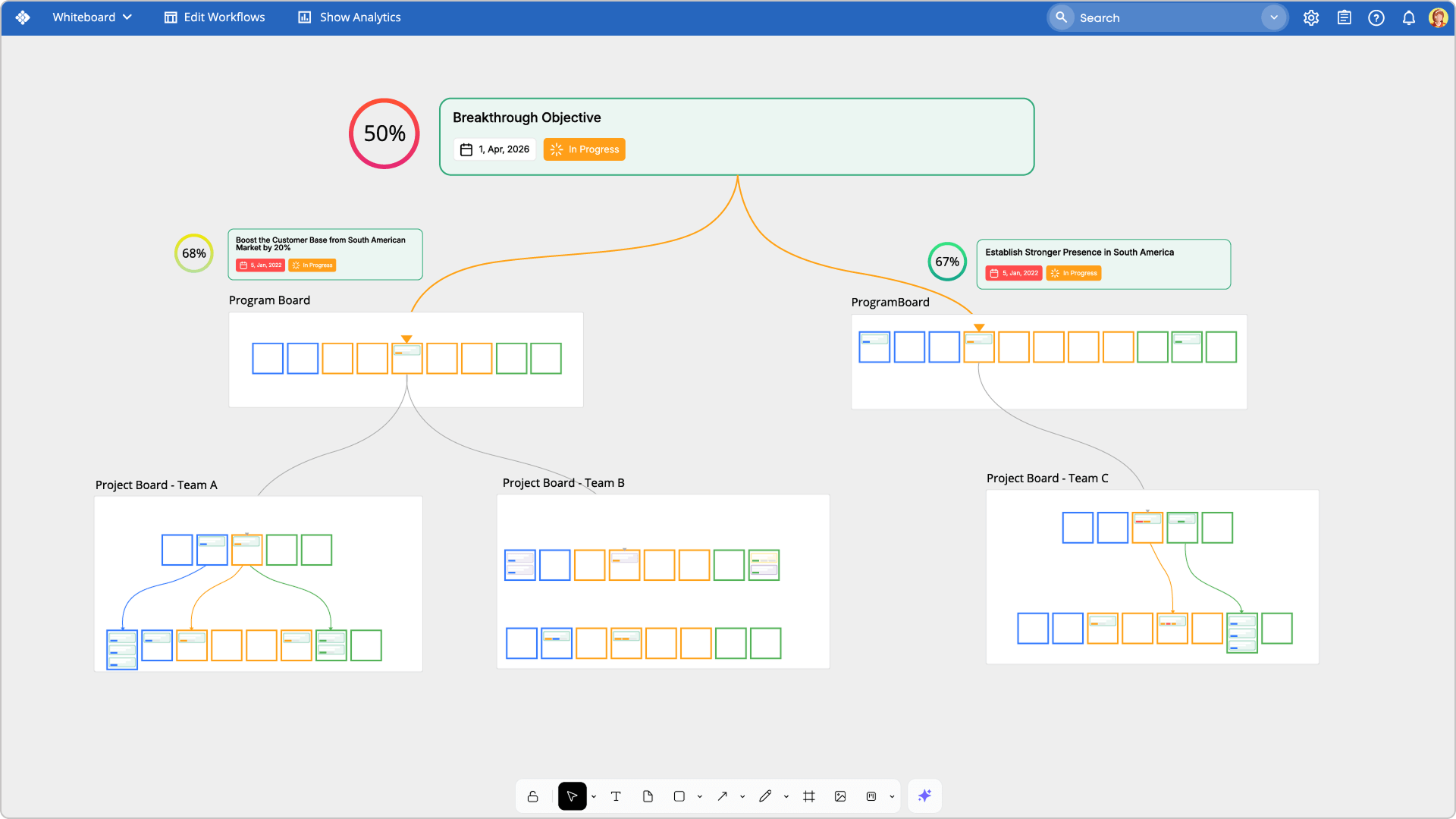
In practice, this can be done using a visual workspace where dependencies and strategic threads are mapped clearly - from high-level goals to portfolio priorities and team boards. When teams see how work connects, they can spot bottlenecks earlier and avoid misalignment that potentially slows progress.
→ How Businessmap supports this
Businessmap enables fully connected strategic alignment through OKR tracking, portfolio workspaces, and multi-layer board hierarchies. Strategy flows into execution boards, and dependency mapping ensures every team member sees how their individual work supports the company goals.
 Visualizing cross-team dependencies contributing to the same objective using Businessmap AI Canvas
Project Planning and Management
PPM software supports:
- Project prioritization, scoring, and portfolio balancing
- Scenario analysis ("what happens if we delay or cancel X?")
- Risk management: risk management boards, early warnings, blockers, and mitigation workflows
- Support for a variety of workflows, including Agile, Waterfall, or hybrid execution models
Beyond prioritization, strong planning requires detailed schedules, work breakdown structures, defined phases and milestones, and visual tools that make timelines and dependencies easy to understand.
→ How Businessmap supports this
Businessmap offers visual portfolio and project boards, as well as risk management tools (blockers, risk dashboards). Scenario analysis is supported, what-if analysis and flow analytics, enable leaders to forecast delays and adjust plans before risks escalate.
Monitoring and Reporting
A PPM platform must provide ongoing visibility into the health of work and strategy, including:
- Real-time dashboards
- KPIs tracking
- Portfolio status updates
- Customizable reporting for executives, PMOs, and teams
Such metrics include delivery performance, schedule adherence, resource stability, and risk exposure. Monitoring those makes teams capable of identifying bottlenecks, managing and forecasting capacity better, and taking data-driven action before issues threaten strategic goals.
→ How Businessmap supports this
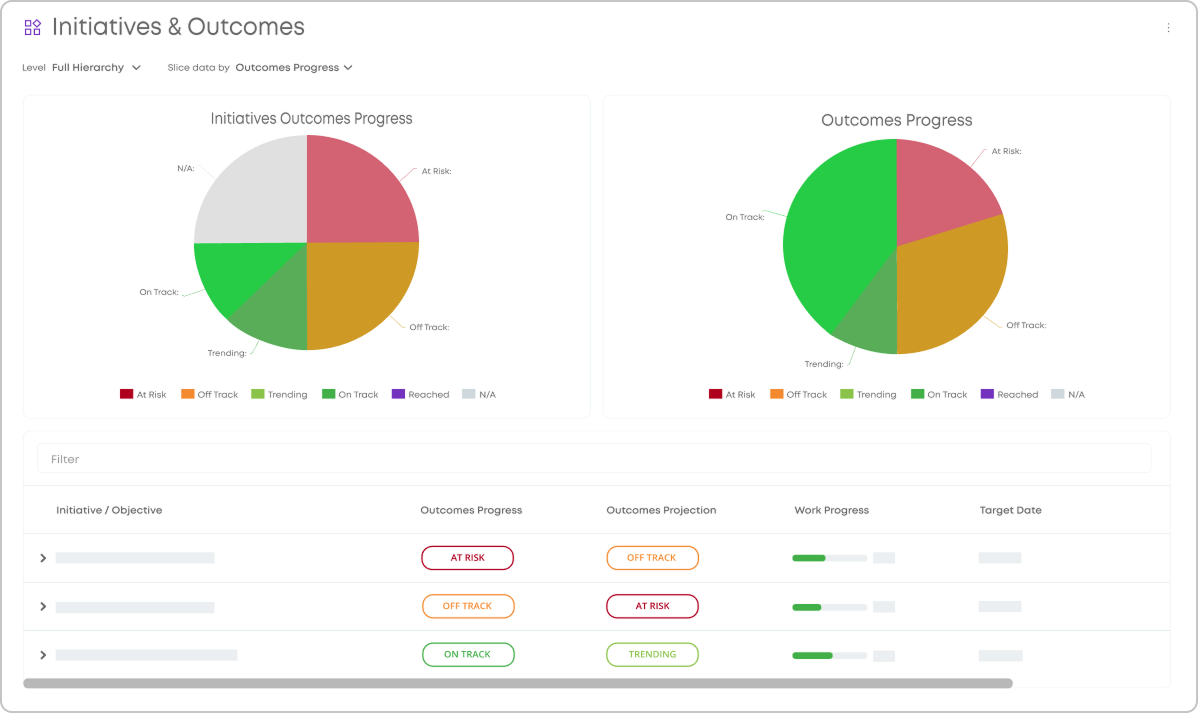
Businessmap offers all of its users multi-level visibility through real-time dashboards, flow analytics, portfolio status reporting, and drill-down performance insights via AI intelligence. Metrics such as cycle time, throughput, and trends help to evaluate progress and adjust execution with confidence.
An executive dashboard with OKRs/KPIs and other important metrics in Businessmap
Run projects. See portfolios. Deliver results. All in a single place.
Resource Management
A PPM system must enable:
- Capacity planning across teams and portfolios
- Visibility into resource constraints
- Demand vs. supply balancing
→ How Businessmap supports this
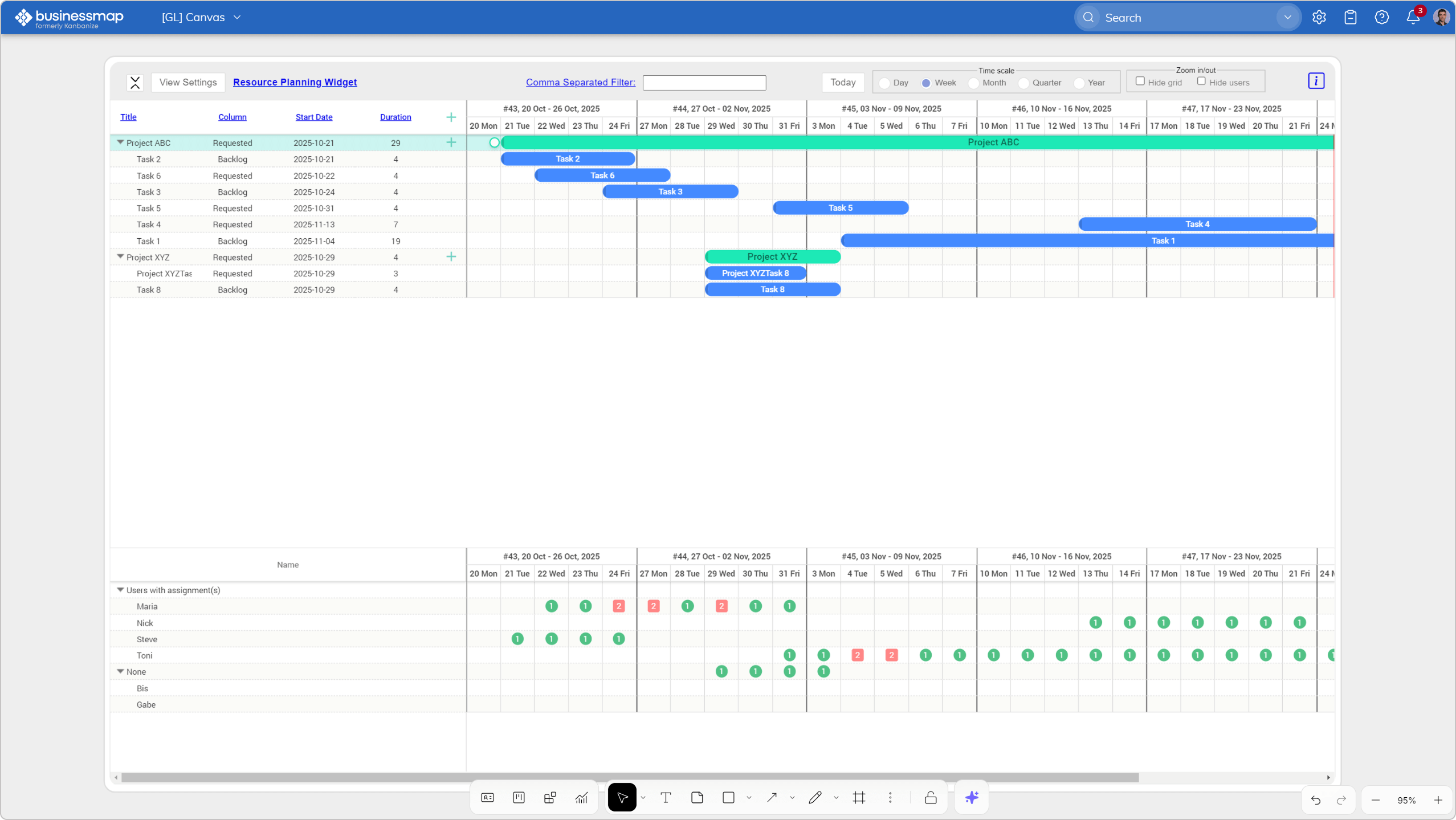
Businessmap responds to these needs through its interactive planning view - a dynamic Gantt chart that visually organizes portfolio initiatives along a timeline. This feature enables teams to plan future work in line with available capacity, review ongoing projects, adjust initiative durations, and establish logical predecessor-successor relationships between tasks.
Visualizing resource planning dashboard on a global canvas in Businessmap
Customization
PPM tools must fit your organization, not the other way around. Requirements include:
- Custom workflows
- Custom fields, scoring models, and portfolio structures
- Flexible swimlanes, boards, views, and layers
- Collaboration tools accessible across departments
Flexible swimlanes, board views (Kanban boards, timeline, roadmap, strategic view), and built-in collaboration features create an environment where cross-departmental work is intuitive and transparent.
→ How Businessmap supports this
Businessmap is praised for its fully customizable workflows, unlimited board hierarchies, flexible layouts, and collaboration features like comments, mentions, notifications, and shared reporting. It adapts to any business model, from Agile and Waterfall to hybrid environments.
Automation
Automation reduces manual effort and keeps alignment. PPM tool requirements include:
- Automated workflows
- Policy enforcement
- Notifications and governance rules
- AI enhancements
Advanced PPM systems should enable automating handoffs and approvals, while using AI insights in PPM can help leaders understand bottlenecks, risks, and performance trends.
→ How Businessmap supports this
Businessmap includes automated governance policies, "if-this-than-that" process automation, and AI-powered insights for instant interpretation of performance patterns. Team members get proactive recommendations and trend analysis, helping them adapt quickly and confidently.
Scalability
PPM software must scale as organizations grow across portfolios, departments, locations, and management layers. Enterprise governance, permissions, and multi-level visibility are crucial for handling dozens or hundreds of concurrent initiatives.
→ How Businessmap supports this
Businessmap is designed for horizontal and vertical scaling. Large enterprises use it to coordinate hundreds of boards across every layer of strategy and execution without losing visibility.
Integrations
A modern PPM tool must integrate seamlessly with your operational systems, including:
- ERP
- CRM
- Financial systems
- Project management platforms
- ALM/DevOps tools
- BI platforms
→ How Businessmap supports this
Businessmap integrates with Jira, Azure DevOps, GitHub, Microsoft Teams, Tableau, Power BI, Google Data Studio, Zapier, and many more. Almost every UI action is available via API for deep customization and automation. Specialized integration partners are available to help organizations extend the ecosystem with minimal effort.
Security Considerations
Enterprise PPM tools require:
- Role-based access
- Encrypted data storage
- Audit logs
- SSO/SAML
- Compliance alignment
→ How Businessmap supports this
Businessmap provides enterprise-grade RBAC, SSO, granular permissions, encryption, and detailed audit trails to meet compliance and governance standards.
Support Services
Successful implementing any solution depends on onboarding, consulting, training, ongoing guidance, and migration support. Without strong support, adoption suffers, especially in large organizations that are transforming.
→ How Businessmap supports this
Businessmap offers guided onboarding, migration support, Enterprise training, a video library, expert consulting, and dedicated success managers who ensure long-term value realization.
Cost and Total Cost of Ownership (TCO)
Key cost factors include:
- Subscription vs. on-premises licensing
- Implementation time and complexity
- Professional services and customization
- Ongoing maintenance, upgrades, and support
→ How Businessmap supports this
Businessmap offers simple, transparent pricing starting at $8/user/month (for 100 users annually) with no feature limitations, making it one of the most cost-effective enterprise solutions.
PPM Tool Requirements Checklist
Best Practices for Successful PPM Software Implementation
- Start with clear strategic and portfolio goals
- Establish a shared prioritization model (avoid local optimizations)
- Implement unified planning cadences
- Visualize dependencies and constraints early
- Roll out in stages: start with key teams and scale gradually
- Build a communication and governance framework
- Track performance with meaningful dashboards and metrics
- Always review and adapt processes
How to Choose a PPM Software in 5 Steps
Step 1: Define Your Strategic and Operational Needs
Clarify what problems you need your PPM tool to solve: visibility, prioritization, resource planning, alignment, capacity, or governance.
Step 2: Identify Your PPM Tool Requirements
Use a structured PPM tool requirements guide and checklist to pinpoint the functionalities your organization cannot operate without. Include requirements for strategic alignment, project planning, portfolio reporting, resource management, automation, integrations, security, scalability, and implementation support.
Step 3: Evaluate Vendors Based on Fit
Compare vendors against your PPM vendor selection criteria. Check integrations, scalability, strategic alignment capabilities, and overall ecosystem compatibility.
Step 4: Assess Implementation Complexity
Even a feature-rich PPM platform can fail if implementation is too complex or adoption is weak. Review the vendor's onboarding process, migration support, deployment timeline, training resources, and PPM rollout change-management approach.
Step 5: Compare Trials, Demos, Pricing and Long-Term Value
Shortlist 2–3 platforms and run hands-on evaluations to validate them through demos, trials, or pilot programs. Use real portfolio scenarios to evaluate how each platform handles your actual workflows, reporting needs, dependencies, their usability and fit, and explore ppm software pricing.
PPM Vendor Selection Criteria Checklist
The following PPM vendor selection criteria can help you compare solutions more objectively:
| Selection Criteria |
What to Evaluate |
| Strategic fit |
Can the tool connect OKRs, KPIs, and strategic goals to portfolios and projects? Does it provide hierarchies and dependency visibility to show how work supports company objectives? |
| Portfolio visibility |
Can leaders see portfolio health, dependencies, risks, progress, and performance across departments in real time? |
| Work prioritization |
Are there scoring models, prioritization techniques, and what-if analysis tools for evaluating project value and impact? |
| Resource and capacity planning |
Can the platform visualize capacity, highlight constraints, and forecast resource availability? |
| Risk management |
Can the platform visualize capacity, highlight constraints, and forecast resource availability? |
| Scenario modeling |
Does the tool support scenario planning and portfolio simulation for budget, capacity, and timeline trade-offs? |
| Scalability |
Can the tool support multiple teams, portfolios, departments, locations, and management levels as your organization grows? |
| Customization and flexibility |
Can the system adapt to your organization's workflows, portfolio structures, fields, governance rules, and reporting needs? |
| Automation and AI |
Does the system automate approvals, handoffs, and governance rules? Does AI provide insights, trend analysis, and recommendations? |
| Security requirements |
Does the platform support enterprise RBAC, encryption, SSO/SAML, and compliance standards? |
| Integrations |
Can the tool connect with ERP, CRM, DevOps, BI tools, financial systems, and existing project management platforms? Is API access available? |
| TCO evaluation |
Are licensing, implementation, customization, support, training, and maintenance costs transparent and predictable? |
| Implementation readiness |
Does the vendor provide migration tools, onboarding plans, deployment timelines, and change-management support? |
| Support and training |
Are dedicated success managers, training programs, guided onboarding, and ongoing consulting available? |
What Questions to Ask During a PPM Software Demo?
Beyond the vendor selection criteria, our experience shows that the following questions are essential to discuss and are frequently raised during demo sessions:
- How does the platform connect strategic goals to portfolios, programs, projects, and team work?
- Can we see portfolio health? Can we see project status and forecast?
- What dashboards are available for project health?
- Can we see risks and dependencies?
- How to prioritize and score projects?
- How to manage approvals and reviews?
- How to handle capacity management?
These questions make it easier to compare vendors consistently and identify the best solution that fits your current and future portfolio management needs.
FAQs
What should enterprises look for in a portfolio management software platform?
Strategic alignment, portfolio visibility, scalable governance, resource capacity insights, risk management, and robust analytics.
What features are important for managing large portfolios?
Multi-layer hierarchies, dependencies mapping, scenario modeling, capacity planning, automation, and enterprise-level reporting.
How do you define PPM tool requirements?
PPM tool requirements are the capabilities your organization needs to plan, prioritize, manage, and monitor projects and portfolios. They usually include strategic alignment, portfolio visibility, resource planning, risk management, reporting, workflow customization, integrations, security, scalability, and support.
What are the most important PPM vendor selection criteria?
The most important PPM vendor selection criteria include strategic fit, portfolio visibility, resource and capacity planning, prioritization capabilities, reporting, customization, integrations, security, PPM implementation support, scalability, and total cost of ownership.
How do you compare PPM software vendors?
To compare PPM software vendors, create a requirements checklist, define must-have capabilities, evaluate each vendor against the same criteria, run demos or trials using real scenarios, review implementation complexity, and compare total cost of ownership.
What are must-have PPM software features?
Must-have PPM software features typically include portfolio dashboards, project prioritization, strategic alignment, resource planning, risk tracking, reporting and analytics, workflow customization, integrations, role-based permissions, and executive visibility.
Which vendors offer free trials for PPM platforms?
Businessmap (free trial on demand, demo center), OnePlan (free trial), Celoxis (14-day trial), and others, depending on vendor.
Run projects. See portfolios. Deliver results. All in a single place.



 Visualizing cross-team dependencies contributing to the same objective using Businessmap AI Canvas
 An executive dashboard with OKRs/KPIs and other important metrics in Businessmap
 Visualizing resource planning dashboard on a global canvas in Businessmap