What Do You Need to Successfully Plan a Portfolio?
If execution is the engine of the business, planning is the steering system. Both are required to move in the right direction, at the right speed, with the right investments.
Here are the core reasons why planning is at the heart of portfolio success.
Planning connects strategy to real work
A strategic plan sets the direction, but the portfolio plan determines how the organization actually goes in that direction. Planning transforms your high-level strategy into actionable objectives, timelines, and success metrics.
In portfolio terms, this means:
- Selecting the initiatives that directly advance strategic goals
- Sequencing them realistically
- Ensuring they have the right resources, budget, and risk controls
Planning eliminates uncertainty in project management
Working "project by project" without a portfolio planning layer leads to nothing good, think chronic delays, frequent reprioritization, lack of transparency, PMs spending hours manually fixing schedules.
Portfolio planning provides the structure, cadence, and discipline needed to run predictable operations.
Planning improves resource and capacity optimization
Every organization has more ideas than capacity. Portfolio planning solves this by:
- Making resource availability visible
- Preventing hidden overload
- Ensuring the right teams focus on strategic initiatives
- Allowing PMOs to model different investment and staffing scenarios
Planning increases transparency, credibility, and accuracy
Accepting uncertainty is a critical planning skill. The strategic planning process encourages identifying risks, dependencies, constraints, and assumptions early.
A portfolio that plans for the unknown is more resilient, realistic, and better equipped to adjust without chaos.
Planning prepares organizations for change
Unexpected events will disrupt even the best plans. Portfolio planning gives PMOs the ability to:
- Model multiple scenarios
- Adjust timelines based on capacity
-
Reprioritize portfolios based on measurable value
- Add or remove initiatives without destabilizing the system
It's not about perfect plans, it's about adaptive plans grounded in reality.
Run projects. See portfolios. Deliver results. All in a single place.
Essential Project Portfolio Planning Software Capabilities
Below are the essential capabilities your project portfolio planning software must include.
| Key capability |
What to look for |
| Smart Planning |
AI-supported analysis, insights into trends, and forecasting | Data-driven prioritization | Automated scenario modeling | Probabilistic estimates | Dependency-aware planning
|
| Optimized Workflows |
Customizable planning workflows | Interconnected boards across strategy → portfolio → execution | Automated handoffs | Clear process definitions | Policy-driven governance
|
| Timely Project Delivery |
Update schedules automatically | Show real-time delivery progress | Forecast completion dates | Highlight delays or blockers early | Provide dependency impact analysis
|
| Resource and Capacity Overload Signals |
Capacity dashboards | Workload modeling | Warnings for overloaded teams | Resource allocation scenarios | Portfolio-level constraint visibility
|
| Bottleneck Dashboards & Flow Analytics |
Resource bottlenecks | Workflow constraints | Cycle time increases | Delivery instability | At-risk initiatives
|
| Integrations |
Portfolio planning requires unified data. Without integrations, PMOs are stuck stitching spreadsheets together. Integrations reduce manual work and preserve data reliability. |
How to Set Up Project Portfolio Plans in Businessmap
Businessmap is a PPM solution designed for deeply interconnected planning, from strategic objectives to day-to-day execution. Here's how organizations use Businessmap to build and manage portfolio plans with clarity and precision.
1. Break Down Strategic Initiatives into Projects and Work Items
Strategic portfolio planning begins with alignment.
In Businessmap, you can:
- Create an Initiatives (strategic) workflow
- Break initiatives into portfolios and sub-projects
- Link projects to team boards using parent-child relationships
- Visualize how day-to-day work contributes to strategic results
This ensures transparency from the C-suite down to individual task owners.
 Visualizing cross-team dependencies contributing to the same objective using Businessmap AI Canvas
2. Use Timeline Workflows for Team-Level Planning
Businessmap's Timeline workflows are ideal for:
- Planning team-level work
- Sequencing tasks
- Visualizing delivery commitments
- Tracking cross-functional initiatives
This calendar-style view gives teams a real-time overview of planned, current, and upcoming work.
3. Use the Gantt Chart for Portfolio Planning and Dependencies
If you manage complex initiatives with interdependencies, Businessmap's Gantt view helps you:
- Visualize project timelines
- Map task-to-task dependencies
- Track planned vs. actual progress
- Adjust project durations with drag-and-drop ease
- Identify schedule conflicts instantly
This provides the full timeline intelligence PMOs need to plan across multiple teams.
→ Watch how to do strategic planning using the Planning View in Businessmap
4. Apply Lean/Agile Planning with Analytics
Businessmap supports data-driven planning through:
- Cycle time analysis
- Throughput analytics
- Bottleneck identification
- WIP aging charts
- Cumulative flow diagrams
Using the "Workflow Performance Summary" widget in Businessmap to monitor key process metrics at a glance
For forecasting, Businessmap offers Monte Carlo simulations, giving PMOs:
- Probabilistic forecasts
- Best-case/worst-case completion windows
- Portfolio-level delivery predictions
This reduces uncertainty and increases planning accuracy.
5. Manage Portfolio Flow and Capacity Constraints
Effective planning requires flow stability. In Businessmap, you can:
Capacity-aligned planning ensures predictable portfolios.
6. Review Your Portfolio Using Regular Cadences
To maintain planning discipline, PMOs can run:
- Monthly or quarterly strategic reviews
- Portfolio syncs
- Program increment planning
- Risk and dependency reviews
- Team-to-management alignment sessions
Portfolio boards make these sessions visual, objective, and outcome-focused.
Reviewing key OKRs/KPIs progress using executive dashboards in Businessmap
FAQs
Which PPM software provides advanced resource and financial planning capabilities?
Businessmap offers custom solutions for resource and financial planning to fit specific scenarios. Planview and Celoxis provide advanced resource and financial planning capabilities, including capacity balancing and real-time budgeting.
Which PPM tools integrate with ERP or Agile tools for portfolio planning?
Businessmap, Jira Align, Planview, OnePlan, and Planisware integrate with major ERP systems, Jira, Azure DevOps, Power BI, Salesforce, and more.
What PMO tools provide automatic report generation and portfolio dashboards?
Businessmap, Planview, and Microsoft Project offer portfolio dashboards with automated reporting, real-time updates, and analytics. Businessmap's AI capabilities offer generative and conversational modes inside the analytics dashboard, so you can better understand insights and trends.
Are there PMO software options with AI-powered forecasting and risk identification?
Yes. Businessmap leads with AI-assisted insights, Monte Carlo forecasting, and automated trend analysis. Planview, Celoxis, and Planisware also offer emerging AI capabilities.
Further reading:
Businessmap is the most flexible software
to gain full work visibility across teams & portfolios



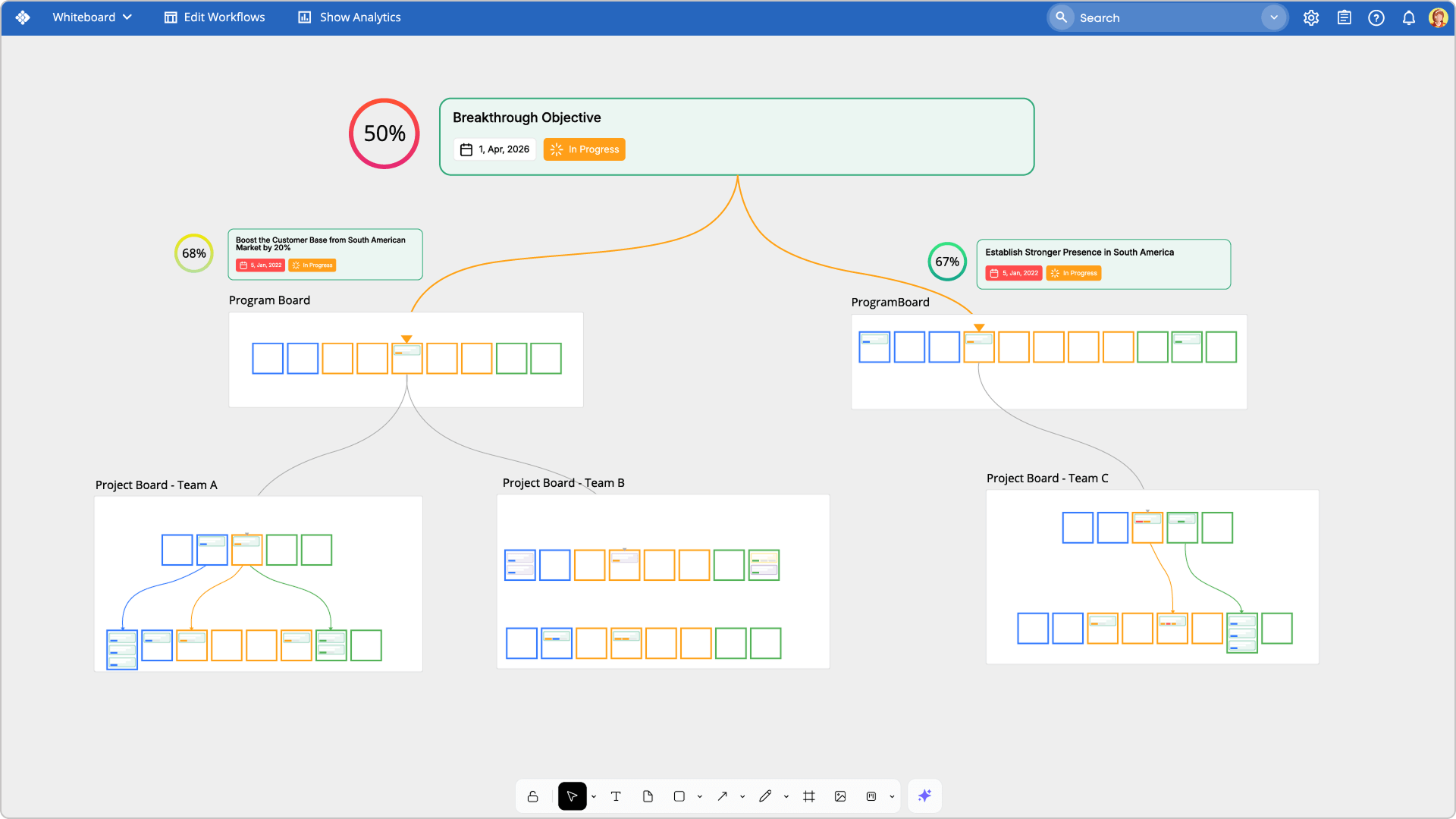 Visualizing cross-team dependencies contributing to the same objective using Businessmap AI Canvas
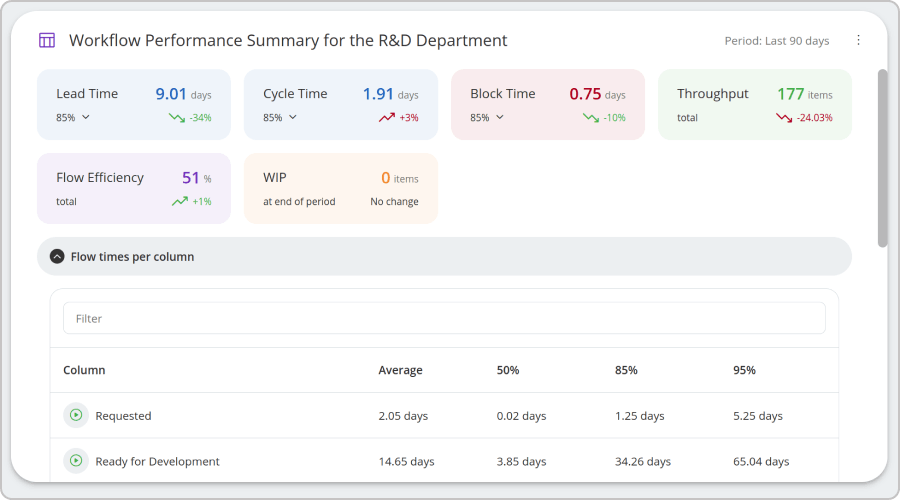 Using the "Workflow Performance Summary" widget in Businessmap to monitor key process metrics at a glance
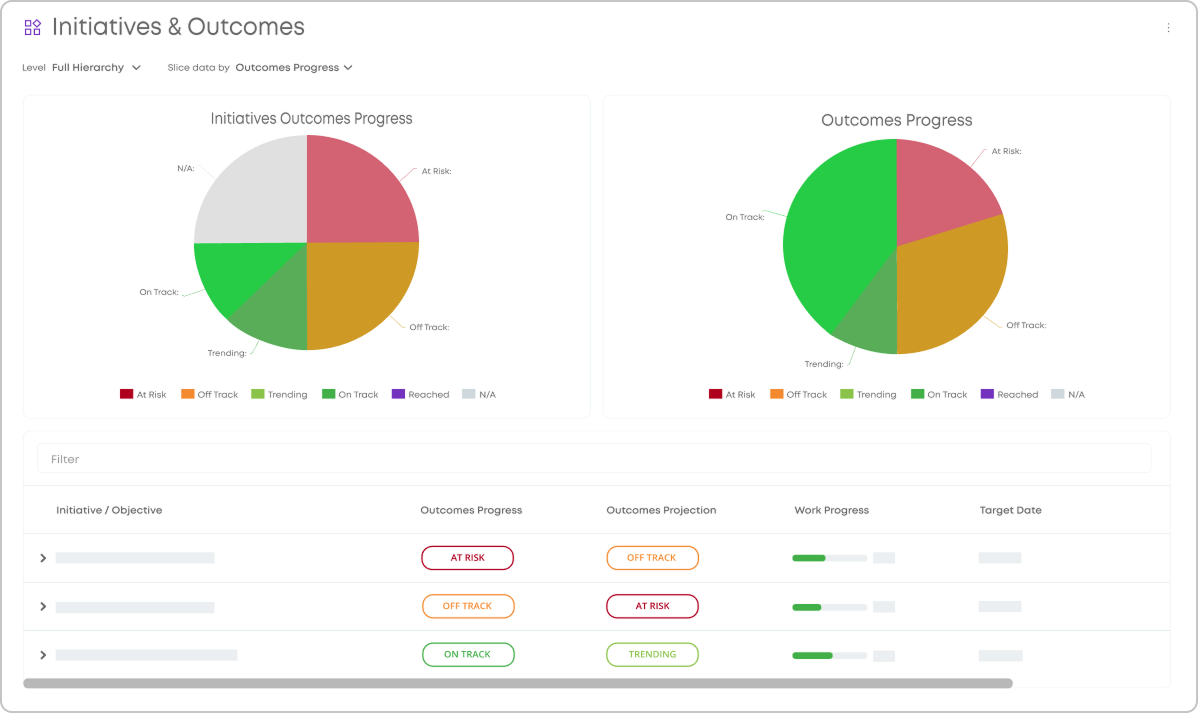 Reviewing key OKRs/KPIs progress using executive dashboards in Businessmap