Kanban boards and swimlanes transform chaotic workflows into crystal-clear visual systems. Horizontal swimlanes divide across boards, grouping tasks by priority, type, or custom criteria, giving teams instant clarity on what matters most while maintaining focus on ongoing work progress.
In this guide, we'll explore Kanban swimlanes, how to use them across multiple teams, and the best Kanban board tool with swimlane capabilities.
What Are Kanban Swimlanes?
Kanban swimlanes are horizontal lines on a Kanban board that organize tasks into categories based on factors such as project type, priority, or team. This feature helps improve task organization, workflow visibility, and process optimization, especially for teams handling multiple projects simultaneously.
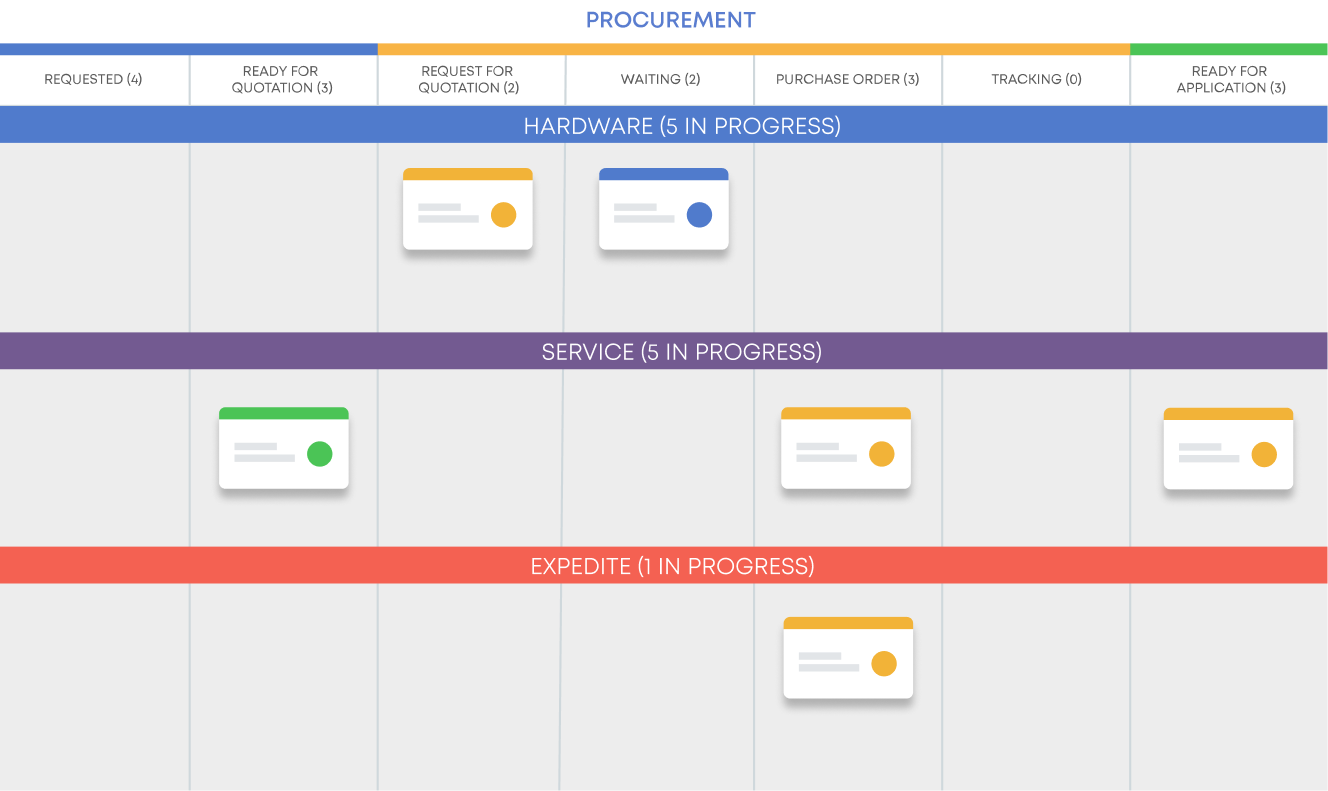 Visualizing work categories using swimlanes on a Kanban board
Why Use Kanban Swimlanes for Multiple Teams or Task Categories?
Kanban swimlanes are particularly useful for managing multiple teams or work categories in parallel. Using different swimlanes allows teams to organize workflows by function, project type, or priority level without losing visibility of the overall project status.
Key Benefits:
- ✓ Separate tasks by team or project type
- ✓ Visualize priorities for smoother work coordination
- ✓ Tracking dependencies between tasks and teams for better alignment.
- ✓ Improving resource allocation by clearly visualizing workloads.
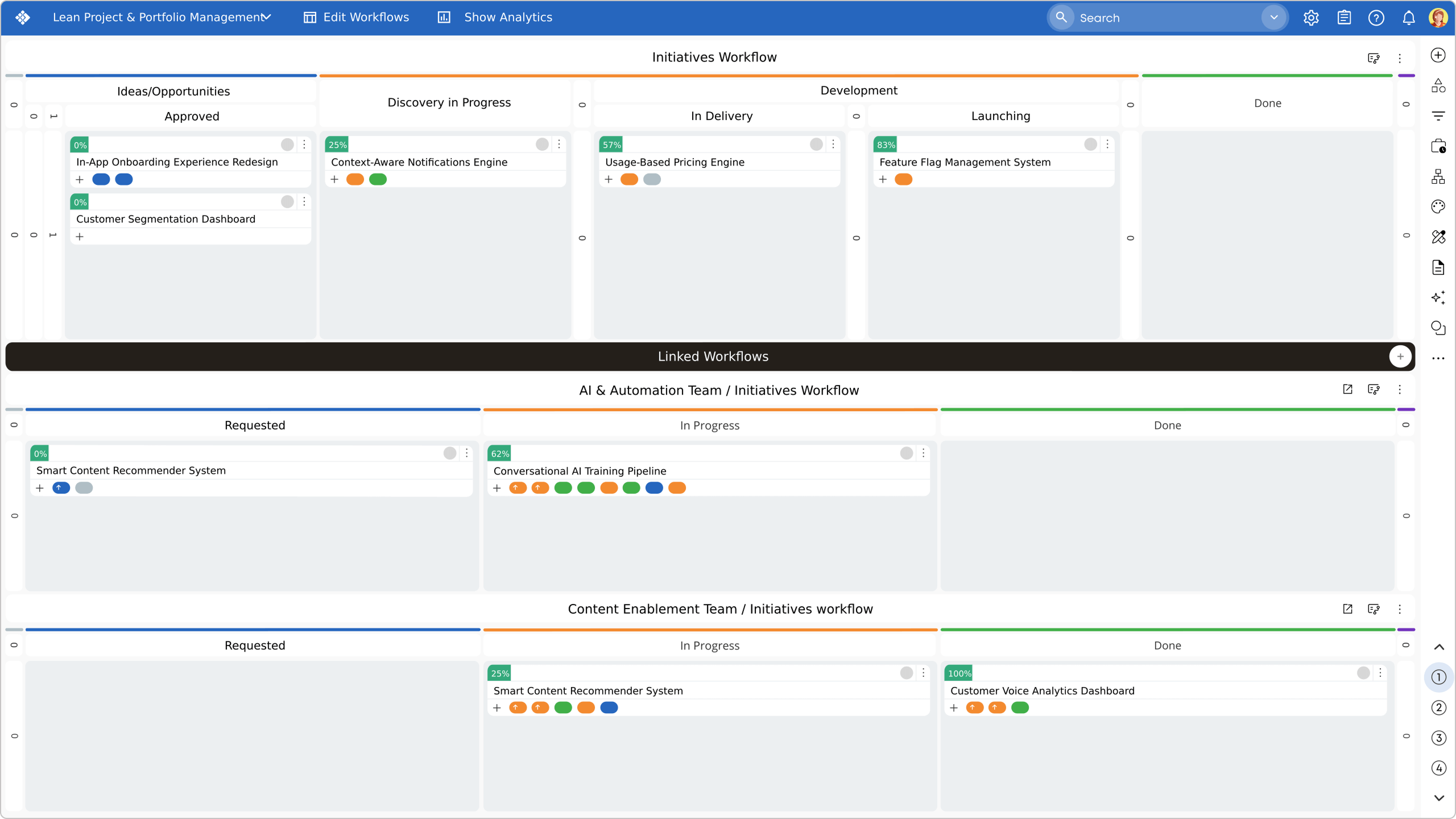 Visualizing multi-level swimlanes that provide a unified view across projects, teams, and tasks in Businessmap
Which Kanban Software Offers the Best Swimlane Functionality?
Businessmap stands out for its advanced swimlane features, ideal for enterprise needs. It enables granular task prioritization, multi-team coordination, and real-time progress tracking.
Businessmap enables teams to:
- Create customized swimlanes based on projects, priorities, or teams.
- Support multi-level swimlanes to provide a holistic view across initiatives.
- Visualize cross-team dependencies directly within the swimlanes.
Enterprise Success Story
SSOE Group
By adopting Businessmap, SSOE improved operational transparency across teams by utilizing swimlanes, customizable Kanban boards, and real-time dependency tracking. Teams customized boards with multiple swimlanes, column splits, and color-coding, empowering ownership across 600 users without standardization. These features allowed SSOE to visualize workflows, monitor task progress, and quickly identify bottlenecks.
"We found that we could divide work with newer team members to get them valuable experience. (...) After three months, our team is more collaborative and performing better than before. One of the best results of using the Kanban method is better collaboration."
— Josh Zimmerman, Department Manager, SSOE Group
What Makes Businessmap the Best Choice?
Businessmap stands out as the most advanced Kanban software for large-scale, cross-team collaboration. Organizations leverage these unique capabilities:
- Multi-Workflow Management: Create multiple workflows and swimlanes for unlimited task ordering and prioritization.
- WIP Governance: Set WIP limits directly on swimlanes to prevent specialist bottlenecks.
- AI Intelligence: Analyze work in every lane using AI-powered instant insights to explain trends.
Which Kanban Tools Offer the Best Reporting, Analytics, and Automation for Swimlanes?
Businessmap provides powerful reporting, advanced analytics, and automation that work seamlessly with swimlanes to:
- Track performance and progress across multiple teams.
- Automate task assignments based on predefined criteria.
- Generate predictive reports based on past performance data.
Businessmap's AI work analytics offer a more robust solution for teams looking to optimize their workflows.
Conclusion
Organizations seeking powerful Kanban boards with advanced swimlane capabilities need enterprise-grade scalability, customizable workflows, real-time analytics, and sophisticated WIP limits, creating the ideal platform for managing multiple projects, teams, and diverse task categories simultaneously.
Ready to transform your team's workflow?
Join thousands of enterprise teams using Businessmap swimlanes.
Watch Businessmap DemosFrequently Asked Questions
Which Kanban software offers the best swimlane functionality for separating teams or tasks?
Businessmap excels at swimlane customization, allowing teams to separate tasks by priority, project, or team and track dependencies across multiple workflows. Learn more about Businessmap's workflow management capabilities ↗
Can I use Kanban swimlanes for different team tasks?
Yes, modern Kanban software allows you to customize swimlanes for multiple teams and task categories, ensuring full visibility and efficient task allocation.
Which enterprise swimlane software offers the best value for multiple teams?
Businessmap offers the best value for multiple teams with its multi-level swimlanes, cross-team dependency visualization, and advanced reporting that scales seamlessly across enterprise-level projects and portfolios.
How can Kanban swimlanes be used effectively for multiple teams, projects, or task categories?
Kanban swimlanes can be customized to separate teams, prioritize tasks, or categorize work by project type. This provides real-time visibility and ensures clear workflow management across multiple teams or task categories without confusion.
Which tools offer advanced swimlane features like per-column customization or resource management?
Businessmap allows per-column customization. It provides the flexibility to optimize task assignment, visualize resource capacity, and balance workloads across teams, making it the leading choice for enterprise use.

Michaela Toneva
Kanban & Agile Practitioner | SEO & Content Creator
With a never-ending thirst for knowledge and a passion for continuous improvement, Michaela is an Agile practitioner with a good understanding of Kanban, Lean, and Agile methodologies. Her professional background includes SEO and content writing with a dose of sales and a pinch of social media.