A PMO can report on every project in the portfolio and still lose a milestone to a dependency that went unlogged.
It happens when project managers write status updates only for their own work. For instance, when Team A waits on Team B, both managers assume the other side is tracking the hand-off. As a result, nobody writes it down or mentions the roadblock until it is too late.
Writing more reports won’t fix this because a standard report only covers one project and one owner. Instead, treat shared links like real tasks, give them clear owners, and review them often.
Read on to learn four key steps and how to implement them to surface dependency risk before portfolio flow breaks down.
Avoid Reporting Overhead
More reporting doesn't necessarily mean more trust. The 2025 Data Integrity Trends and Insights report notes that 67% of organizations do not fully trust their own data when making decisions, up from 55% a year earlier.
To manage this risk, here are the two key actions to take:
Replace Manual Report Collation with a Dashboard
When a manager copies numbers out of the work tool and puts them into a slide, that slide waits days for the review meeting. By the time it reaches the key decision-maker, the numbers describe past data. And any hand-off risk raised since then remains missing.
Now if a team misses a deadline that its manager reported as green, the leader stops trusting the reports that follow. What you want is to report data current and cut the hours your team spends producing it. That happens when you have a connected portfolio dashboard.
A portfolio dashboard offers a single view for leaders and decision-makers to check the status of every project or initiative at hand. Each time a team member updates a task that is part of a project or initiative, they can see the current progress.
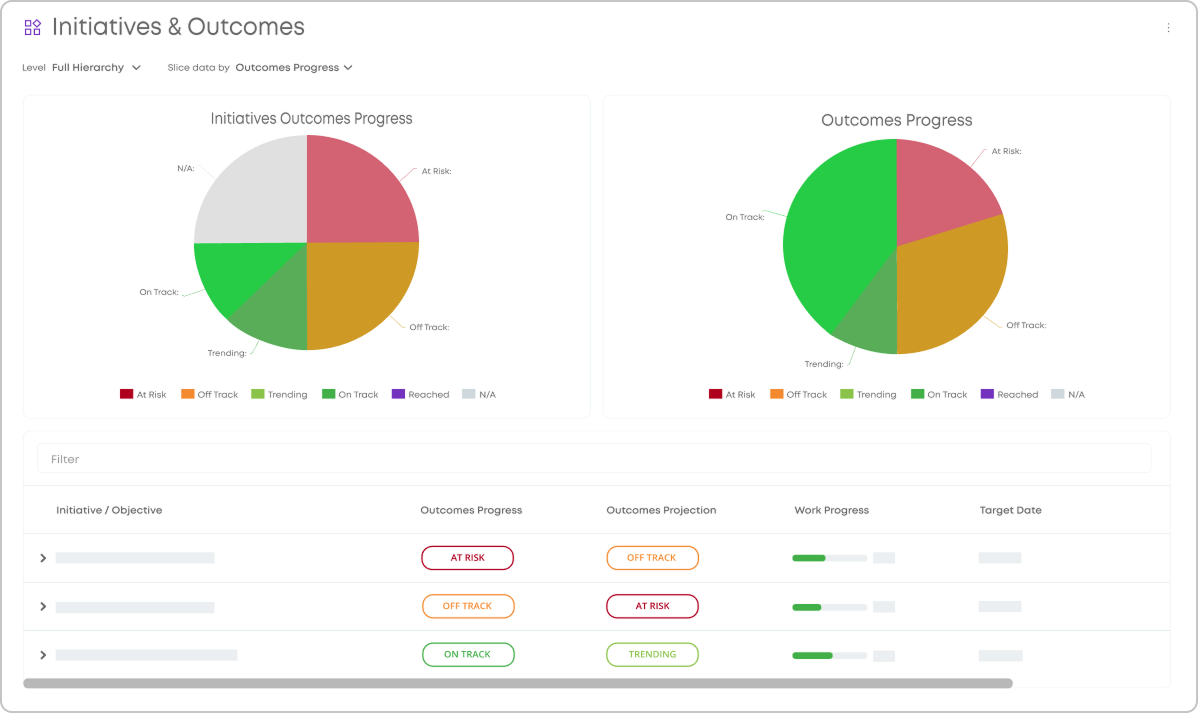
Visualizing goals progress using executive dashboards in Businessmap
Pick One Schedule and One Format for All Reports
Fix one reporting structure and schedule it across all deliverables. In practice, this means every project manager sends an update on the same day, in the same one-page template, and at the same time regardless of the client or project.
It saves time and costs when the team has to rebuild the same report several times over.
The cost is half a day of PMO work per month, as per Wellingtone's 2026 State of Project Management report.
Map Dependencies
Project managers need to assign owners in advance for each task so that there are no blockers to face for the first time during a meeting.
PMI recommends a Decision Structure Matrix solution that maps links between projects before anyone hits a blocker. List all your projects along both axes of a grid and mark every handoff in the cell where two projects cross.
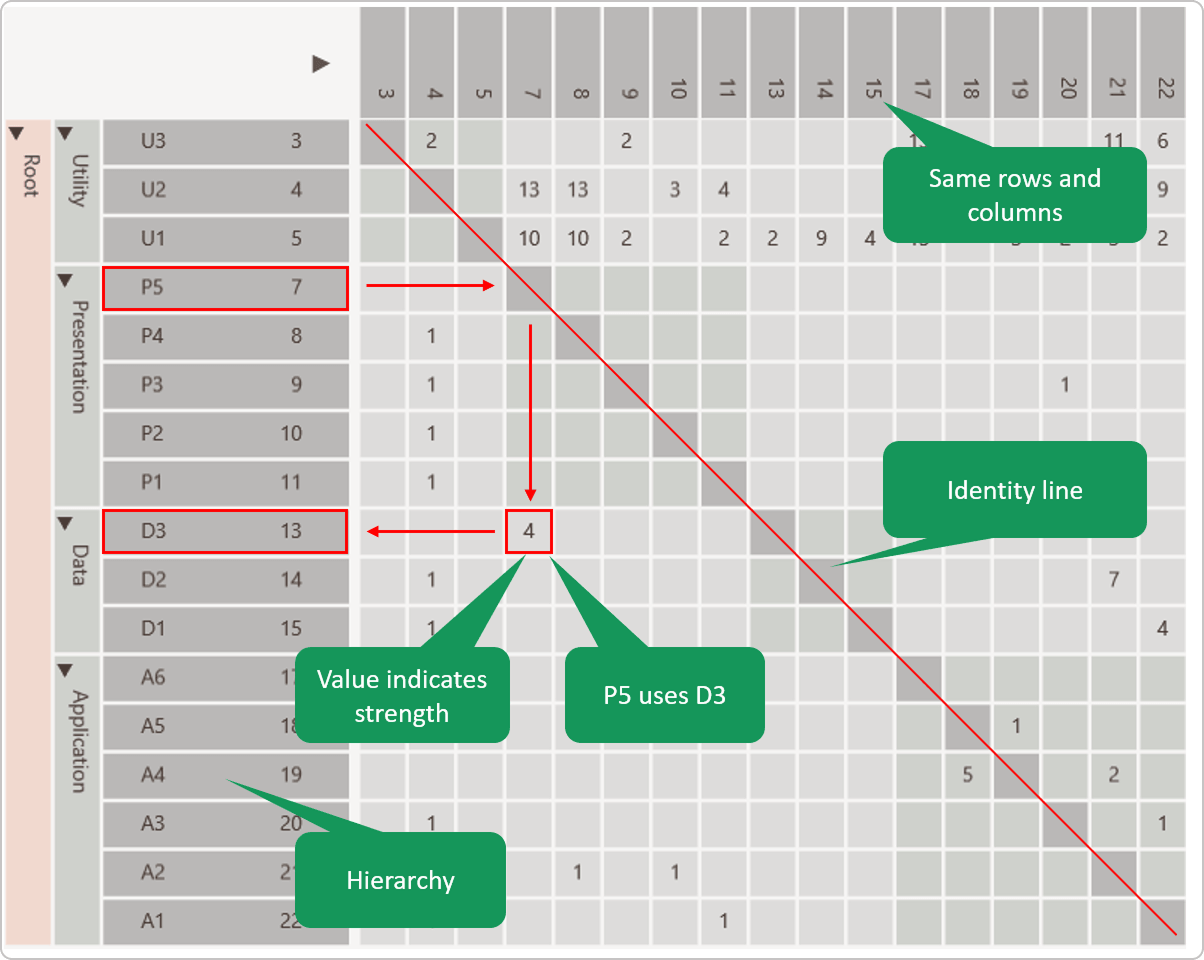 Design Matrix Structure | Source: DSM suite
These two steps end with a review meeting to keep every hand-off logged and acted on:
Log Each Hand-off the Moment Someone Identifies It
Record hand-offs in a shared RAID log (risks, assumptions, issues, and dependencies) instead of a private spreadsheet, and link each entry to the affected task or milestone. The PMO has to keep the log up to date. Every team can add or edit entries directly.
Give Each Hand-off One Owner
A RACI matrix (responsible, accountable, consulted, informed) helps put one name against each item. Do not split ownership between the two connected teams so that no single manager assumes the other one is tracking it.
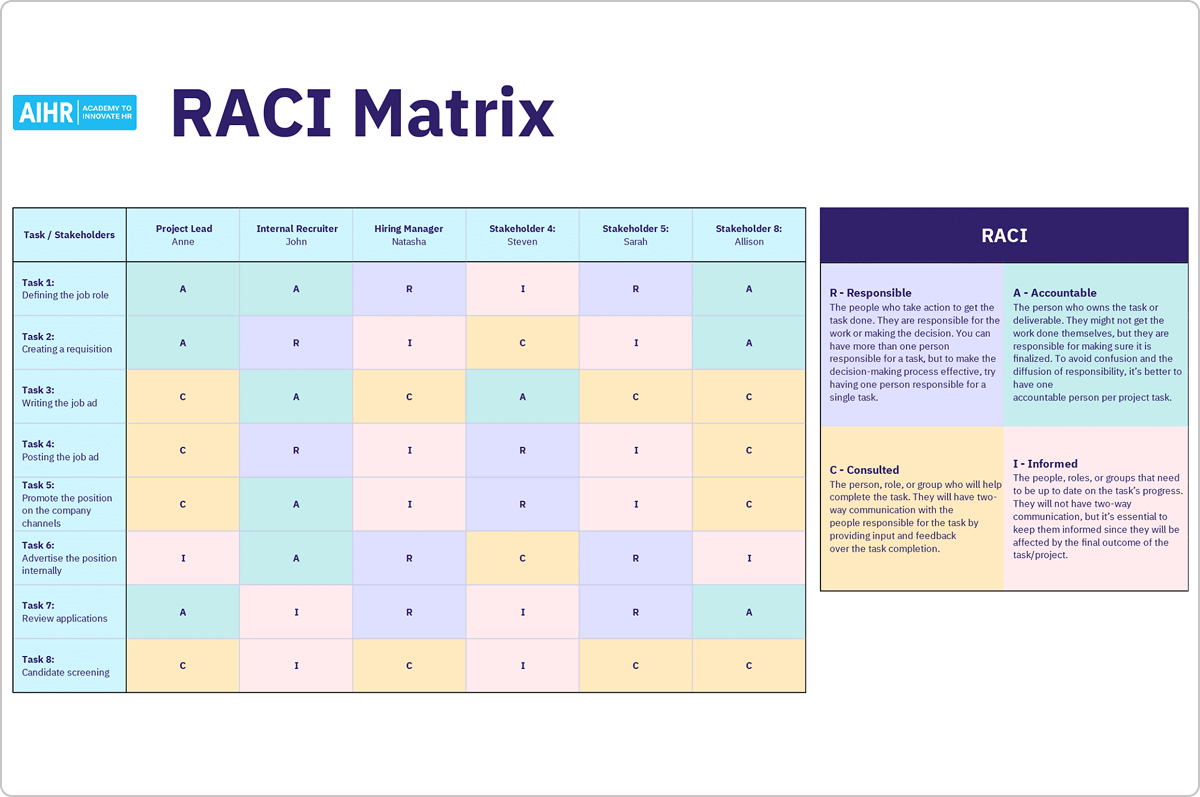 Image Credit: AIHR
The example above comes from a hiring process where a person marked A owns the deliverable and makes sure someone finishes it, even when several people marked R do the hands-on work.
Moreover, IPM's guide to RAID logs supports the single-owner rule, stating that the project manager owns the log even though the whole team contributes entries.
Review the map on its own schedule. For this, you may book a dedicated working session outside the status meeting to reassign owners and reorder priorities, not to read updates aloud.
Operationalize Visibility Through Visual Portfolio Tracking
Create a master board for all teams so that everyone has complete visibility into cross-team blockers and status updates.
These changes go a long way in implementing the same:
Give Every Blocked Project a Visible Status on the Shared Portfolio Board
Let anyone owning the project update the status so that every team reads the same entry. In Businessmap, project owners update a single management board. Because team workflows are linked, everyone sees the same live status automatically.
The setup requires four steps:
- Create a Management Workspace from your dashboard and name its management board.
- Select the team boards that share the hand-off. Businessmap helps connect initiative workflows to the management board, and one management board links up to 20 of them.
- Add the blocked project as a card in the top section of the management board. Then drag that card into each team's workflow to create its child initiatives. Each child keeps a parent link to the project card.
- Track the rollup such that when a team member pulls the first child task to In Progress, the parent card changes to In Progress as well.
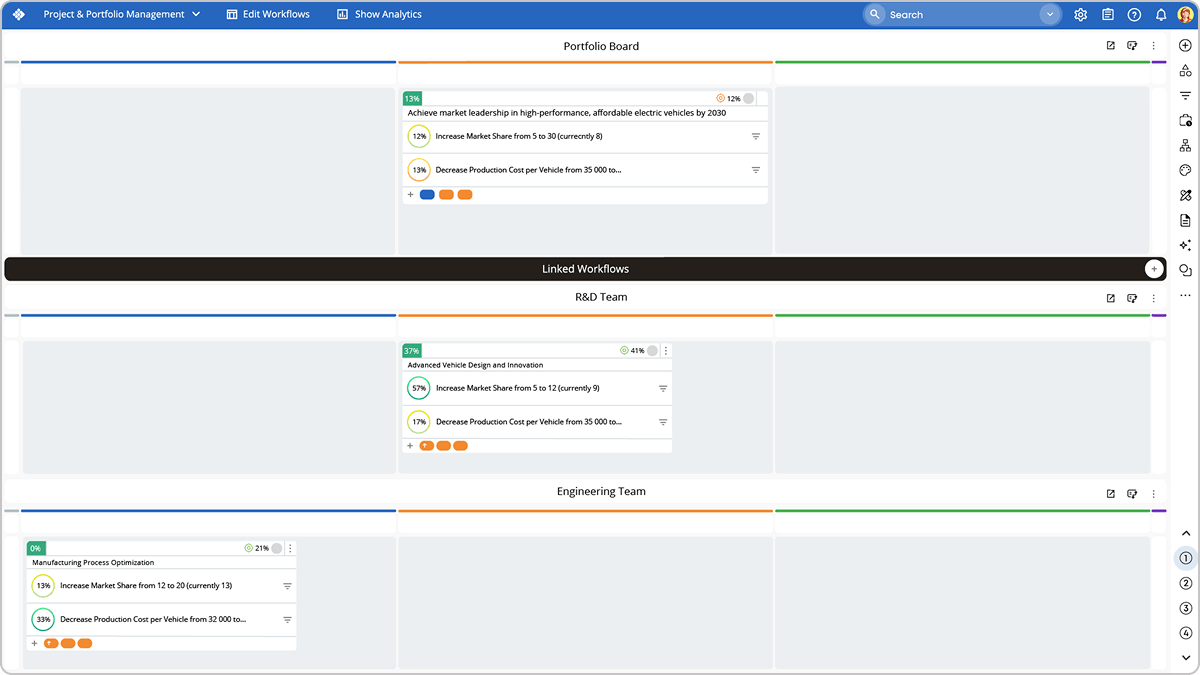 Visualizing and breaking down initiatives and connecting them to individual team boards using a management board in Businessmap
Use One Shared View for Both Sides of a Hand-off, Not Two Separate Systems
McKinsey studied capital project execution and found that decision-makers can wait days or weeks before they hear about a delay. By then, it is too late to help the next team. When teams use separate trackers, they just build this delay into their own work.
Set up the shared view this way:
- Log each hand-off as one shared item: Instead of separate records, create one card that both boards link to. When Team A updates it, Team B sees the change instantly.
- Label the relationship type: This helps your tool track and update downstream dates for you. Most teams use "finish-to-start," meaning Team B begins only after Team A finishes.
- Watch one live dashboard: Read updates from the shared card, not from each other. In Businessmap, linked boards ensure everyone sees the same live data, removing the need for manual reports.
Flag Any Hand-off That No One Resolves within Its Agreed Limit
An analyst may miss old hand-offs in a long log. A solution is to run the check as a rule that flags any hand-off the moment it passes its limit with no one reading the log.
A flat seven-day threshold (limit) applies one number to every hand-off, so it catches a critical-path blocker as late as a routine one.
Tie the limit to the SLA (service level agreement) the two teams agreed on, such as three working days, so the rule acts on a hand-off only after it passes that window. The counter starts when someone logs the blocker, and resets it on any update, so the rule flags a real blocker and skips an expected wait.
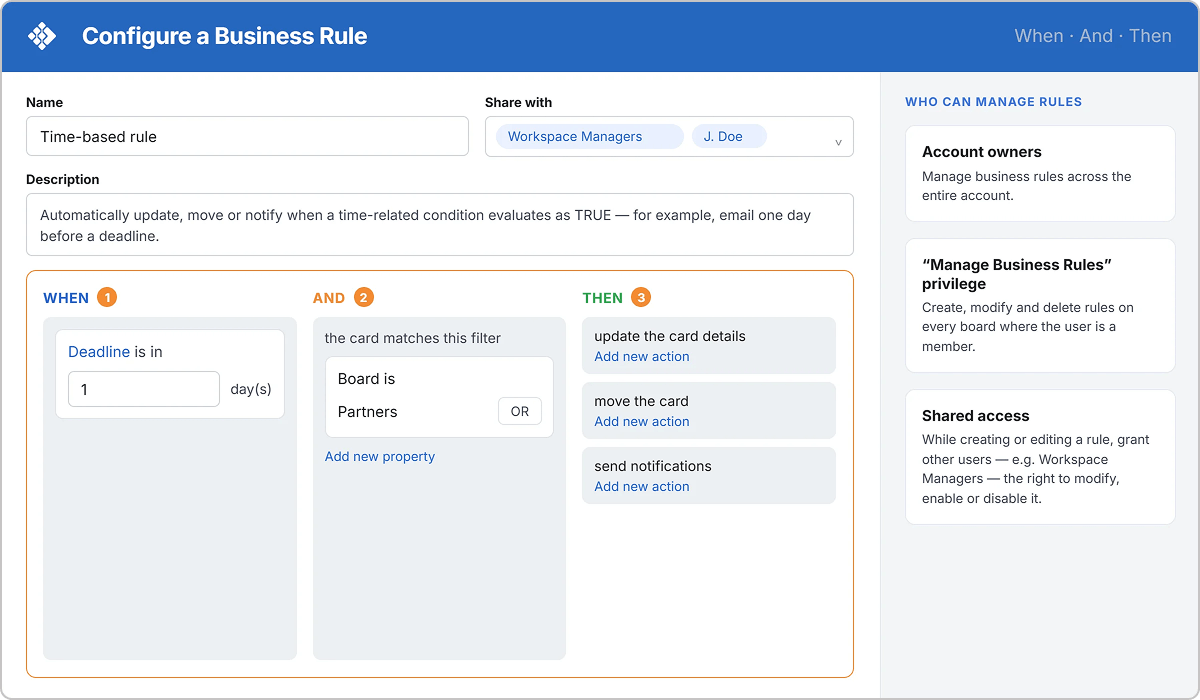
On a first SLA breach, the rule notifies the accountable owner; on a second, the PMO. Configure it in your tool.
In Businessmap, the automation engine helps send the alert on a block-time trigger.
Similar portfolio-level monitoring is built into systems such as Asana Portfolios, as well as platforms like Celoxis and Planview. Teams rely on status and timeline views in these environments to track progress across initiatives. Whatever tool is used, the goal is to give the PMO sufficient visibility to spot SLA breaches early, rather than discovering them weeks later due to a missed milestone.
Knowing the RAG Blind Spot
RAG stands for Red, Amber, Green, the three-color labels most PMOs use to score project health. Even with those in place, you could miss hand-off risk in a specific way.
A common issue is that a project milestone may look green right up until the week of the meeting but slips off because there was no built-in dependency risk into the standard status report. So the PM reads green while a hand-off stays blocked, until the milestone slips.
Add these three checks to catch a blocked hand-off before the slip:
Score Hand-off Risk Separately from the RAG Label
Attach a dependency risk flag to each milestone, separate from its RAG status. Give the milestone a separate rating for each area instead of a blended color.
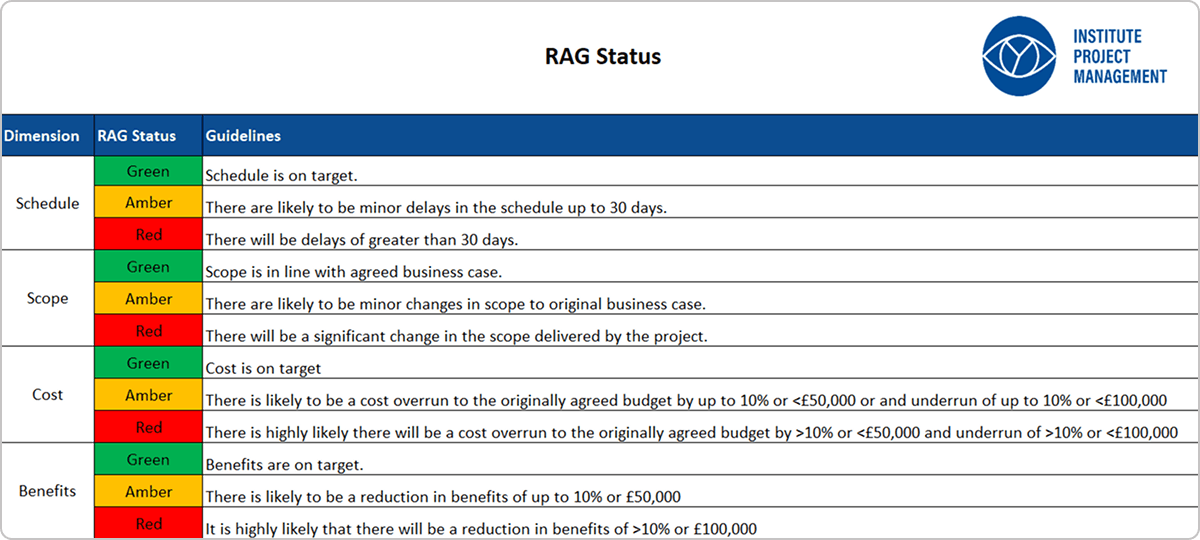 Image Credits: Institute Project Management
IPM's guide to RAG status recommends this across time, cost, scope, and risk. From one overall color, a reader cannot tell which of those is failing. Add the hand-off as its own flag, so no one loses it inside a green milestone.
Enforce a Stated Reason Whenever a Milestone Status Changes
The PMO or sponsor makes the reason mandatory when the status changes. Each reason ties to a measurable signal, such as schedule variance or an open blocker instead of the manager's optimism.
This ends the watermelon report, where a reporter marks a milestone green while its blocker stays unlogged.
Review At-risk Milestones as Their Own List Every Week
This should remain separate from the general portfolio review, which requires pulling every milestone that carries a dependency flag into one weekly list.
In a general review, the PMO gives a flagged hand-off the same attention as a green one. A separate list includes only the milestones with an open blocker, so the PMO clears or escalates each one. This weekly cadence comes from practice, not a dedicated study.
Wrapping up: 4 Changes for Better Cross-Functional Dependency Management
All four changes mentioned above come in a sequence. Start by cutting back on status reports first, and then log every hand-off you know about today with one owner each.
Once the team has kept that log current for a month, add the shared board so both teams read the same status. Then separate dependency risk from the RAG color.
A PMO that runs all four hears about a blocked milestone weeks before the delivery date, with time to reassign the work.
If your goal is to improve visibility across projects, manage cross-functional dependencies more effectively, and keep portfolio work flowing

Brandon Llewellyn
Head of Delivery
Brandon is Head of Delivery at Cirface, an Asana Platinum Solutions Partner, where he builds practical delivery systems for teams at RBC, Blue Cross, Cloudflare, and PayPal. His writing covers delivery strategy, data, process and system design, change management, and automation.