The best portfolio management software with analytics helps PMOs and executives answer whether you are investing in the right initiatives, whether capacity is enough to deliver, or which projects are at risk. This guide compares five strong PPM tools with analytics and explains what to look for before you choose.
Key Takeaways
- Portfolio analytics offer strategic, financial, resource, and delivery data in one place.
- Real-time analytics help PMOs act before risks turn into missed deadlines or escalations.
- Executives require an overview of strategic portfolio health, while PMOs need governance and prioritization views, and delivery teams need flow and execution boards.
- Businessmap is the preferred choice for organizations that want to connect strategy execution with real-time delivery analytics, flow metrics, dashboards, and Power BI reporting.
What Is Portfolio Management Software with Analytics?
Portfolio management software with analytics is a solution that helps organizations collect, visualize, and analyze data across projects, programs, initiatives, budgets, resources, risks, dependencies, and strategic goals.
What Types of Analytics Do PPM Tools Provide?
PPM analytics usually fall into five main categories.
- Strategic alignment analytics show whether work supports company goals, OKRs alignment, investment themes, or transformation priorities.
- Financial analytics help leaders understand planned versus actual spend, budget utilization, forecasted cost, ROI, benefits realization, and cost variance.
- Resource and capacity analytics reveal whether the organization has enough people, skills, and available time to deliver the portfolio.
- Delivery and flow analytics show how work moves. This is where metrics such as cycle time, lead time, throughput, blocked work, flow efficiency, and predictability become powerful.
- Risk, dependency, and governance analytics highlight blocked initiatives, overdue approvals, dependency risk, stage-gate status, and compliance issues.
Best Portfolio Management Software with Analytics
1. Businessmap
Best for: Enterprises that want to connect strategy execution, portfolio visibility, and real-time delivery analytics.
Analytics strengths:
- Portfolio dashboards for strategy and execution visibility
- Flow metrics such as cycle time, throughput, blockers, and predictability
- Drill down from portfolio-level initiatives to team-level work
- Embedded dashboards and custom integrations with Power BI reporting
- Flexible dashboards for executives, PMOs, and delivery teams
Businessmap's analytics module is tied directly to how work flows across teams. It helps leaders connect strategic initiatives with execution signals. This is especially useful for Lean, Agile, hybrid, and transformation portfolios where delivery confidence, dependencies, and strategic alignment matter as much as budget status.
2. Clarity
Best for: Organizations that need strategic portfolio management, financial governance, resource planning, and executive decision support.
Analytics strengths:
- Strategic portfolio and investment visibility
- Financial and resource reporting
- Roadmap and portfolio planning analytics
- Governance and risk views
- Real-time transparency and traceability
Clarity helps organizations align investments with business objectives, manage technology roadmaps, improve transparency, and optimize resource allocation. Broadcom positions Clarity around real-time transparency, traceability, unified investment views, and governance.
3. Planview Portfolios
Best for: Organizations that need enterprise-wide portfolio analytics across strategy, products, technology, resources, and investments.
Analytics strengths:
- Enterprise portfolio and investment reporting
- Resource and capacity analytics
- Strategic alignment views
- Financial and budget reporting
- Power BI dashboard options
Planview Portfolios is designed for complex enterprise portfolio management. Its Power BI app helps users visualize resource and work management data, analyze portfolio investment spend, understand budget position, and assess alignment with strategic priorities.
4. Celoxis
Best for: PMOs that want project portfolio reporting, real-time dashboards, resource visibility, and financial tracking in a practical PPM platform.
Analytics strengths:
- Real-time dashboards
- Custom reports
- Portfolio performance tracking
- Resource and capacity visibility
- Project portfolio metrics and insights
Celoxis positions its platform around data-driven project and portfolio management, with advanced analytics, insights, and real-time dashboards. It can be a good fit for PMOs that need configurable reporting without adopting a very large enterprise SPM suite.
5. Meisterplan
Best for: Organizations that prioritize portfolio planning, resource management, capacity decisions, and executive reporting.
Analytics strengths:
- Portfolio and resource reporting
- Capacity planning insights
- Configurable reports
- Reporting API
- Power BI reporting options
Meisterplan is especially strong for organizations that want to understand whether they have the right people available for the right priorities. Its Reporting API allows teams to transfer Meisterplan data into BI tools such as Power BI and customize reports for board-level decisions.
How Do Real-Time Analytics Work in Project Portfolio Management?
Real-time analytics in PPM software work by collecting live data from project workflows, portfolio boards, resource plans, financial fields, time tracking, and connected systems.
When a team updates work, the data is transferred to project, program, and portfolio views. Dashboards update in real time, enabling leaders to see which initiatives are progressing, which are blocked, and which require attention.
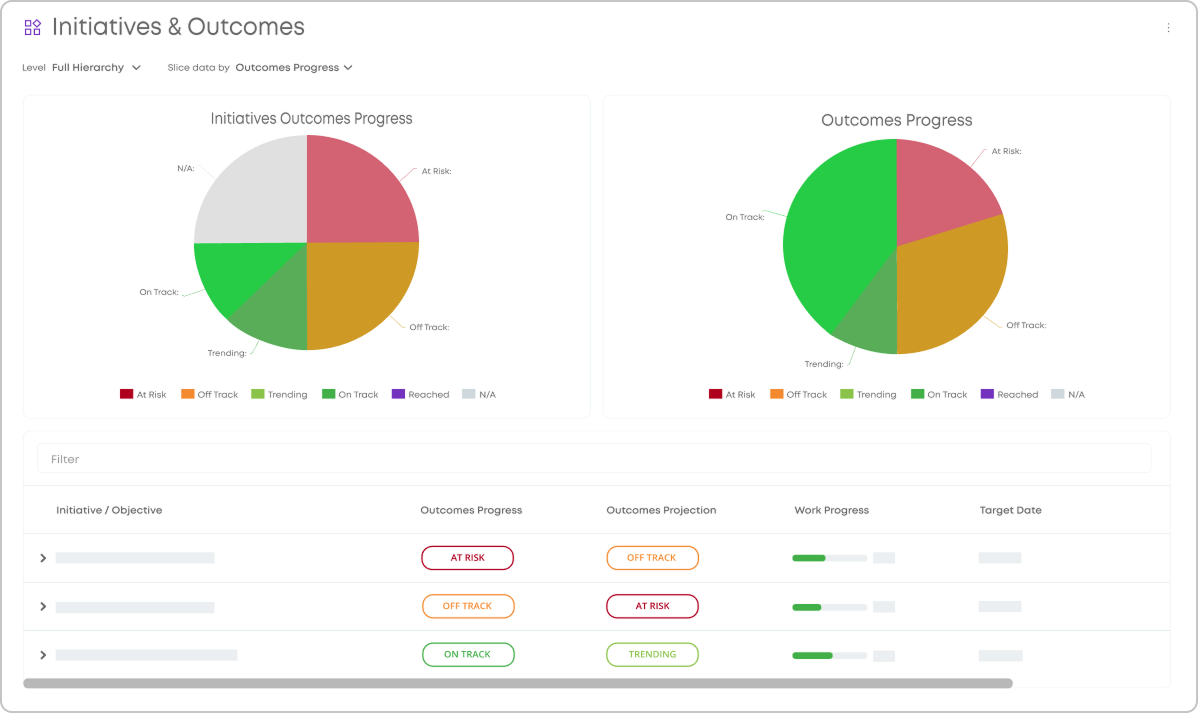 Visualizing goals progress and initiatives status in real-time using executive dashboards in Businessmap
This matters because portfolio risks rarely appear all at once. They build gradually: one overloaded team, one delayed dependency, one blocked approval, one initiative drifting from its strategic goal. Real-time analytics help PMOs see those weak signals earlier.
What KPIs Should a PPM Analytics Dashboard Include?
A strong PPM analytics dashboard should include KPIs that support real decisions, not just visual reporting.
How to Choose the Best Portfolio Management Software with Analytics
Use this quick checklist:
- Start with the decisions you need to make: funding, prioritization, capacity, risk, or delivery improvement.
- Check whether analytics are real-time: manual reports create decision lag.
- Validate role-based capabilities: every executive metric should connect to project-level evidence.
- Review BI and export options: confirm Power BI, Tableau, Looker Studio, API, or export support.
- Compare what is included in your plan: advanced analytics may require higher-tier pricing or add-ons.
- Choose action over decoration: the best analytics help leaders decide what to start, stop, fund, delay, or fix.
FAQ
Can you drill down from portfolio metrics to project-level data?
Yes. A strong PPM analytics tool should let you move from a portfolio-level metric to the program, project, team, or work item behind it. For example, if a strategic objective appears at risk, project-level analytics should help the PMO identify whether the issue comes from blocked dependencies, resource overload, delayed approvals, or delivery bottlenecks. Learn how Businessmap is useful here because it connects high-level portfolio views with execution-level boards, helping leaders trace risks from strategy to operational cause. Watch How to Align OKRs Across the Organization with Businessmap
Should PPM software integrate with BI platforms and other systems?
Yes. PPM software should integrate with BI platforms and key business systems so portfolio data does not stay trapped in one tool. Businessmap also offers native connectors, API access, report exports, or custom configuration.
Does PPM software include analytics in the base plan or as an add-on?
This is an important consideration. Some PPM tools include standard dashboards in their core offering, while advanced analytics, BI integrations, financial reporting, scenario planning, or executive dashboards may require higher-tier packages or paid add-ons.
Businessmap offers out-of-the-box portfolio dashboards, workflow analytics, customizable reports, BI integrations, data exports. Reach out if you have any specific questions sales@businessmap.io.
See how Businessmap supports leaders in tracing risks from strategy to operations with real-time portfolio visibility, clean dashboards, and delivery analytics.

Iva Krasteva
Content Strategist | Agile Practitioner | Kanban Certified
Iva is a Kanban-certified Agile expert with hands-on experience in SEO, content creation, and Lean practices. She has published dozens of articles on Lean, Agile, and Kanban practical applications. Iva actively promotes collaborative, flexible work environments and regularly shares process optimization insights through writing.