McKinsey & Company's The State of Organizations 2026 makes the AI adoption gap clear: 88% of organizations are experimenting with AI, yet 81% report no meaningful bottom-line gains. For project and portfolio management leaders, the message is simple: AI creates value only when it changes how work is prioritized, governed, funded, and delivered.
Businessmap is an AI-powered PPM solution for enterprise teams that need to connect strategy, portfolio planning, execution data, and governance in one system. Instead of using AI as a reporting add-on, Businessmap brings AI into the workflows where PMOs, strategy teams, transformation leaders, and portfolio managers already plan, prioritize, track, and improve work.
Key Takeaways
- AI PPM solutions help leaders make better portfolio decisions, not just produce faster reports.
- The strongest use cases combine AI with workflow visibility, capacity signals, governance, and reliable execution data.
- Businessmap supports AI-enabled PPM through AI Canvas, AI-generated outcomes and OKRs, AI-assisted work breakdown, AI-built value streams, whiteboard insights, workflow modeling, MCP connectivity, integrations, and governance controls.
What Are AI PPM Solutions?
AI PPM solutions are project and portfolio management platforms that use artificial intelligence to analyze work data, summarize portfolio health, surface risks, and support decisions across strategy, capacity, and execution.
In daily portfolio work, AI should help leaders answer practical questions:
- Which initiatives are at risk?
- Where are teams overloaded?
- Which projects support strategic goals?
- What happens if we delay, pause, or accelerate an initiative?
- Where do approvals, dependencies, or blockers slow delivery?
Businessmap is well positioned for these use cases because the platform already connects strategy with execution through management workspaces, team boards, initiatives, outcomes, dashboards, analytics, and workflow visualization. AI becomes more valuable when it can work with visible portfolio data instead of scattered spreadsheets and outdated status updates.
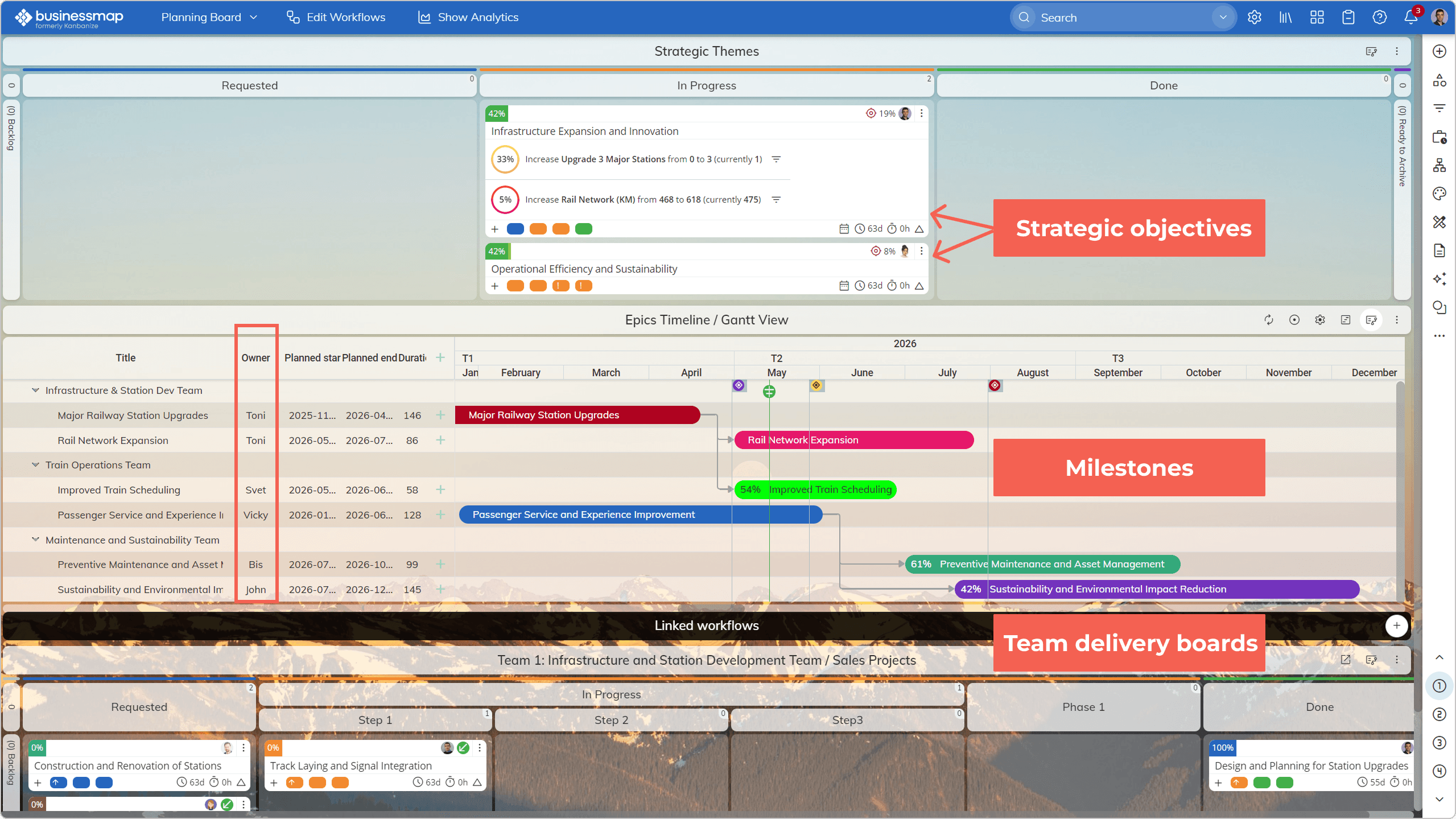 Visualizing strategic objectives progress, milestones, priorities, initiatives owners, and team delivery boards in Businessmap
Learn more about Businessmap Management Workspaces↗
AI creates the most value when it works with real portfolio data, not disconnected status updates.
Explore Businessmap as an AI PPM Solution
Why AI Adoption in PPM Depends on Usability and Leadership
McKinsey's research shows that AI-first operating models require both technical and organizational change. The report also points to a major shift in how people and AI agents collaborate. That matters in PPM because portfolio management is still a human decision system. AI can recommend, summarize, and detect patterns, but leaders still decide what to fund, stop, accelerate, or protect.
How Businessmap Brings AI into PPM Workflows
Businessmap brings AI into the places where teams already plan, structure, connect, and improve work. Leaders can use AI Canvas to create flexible planning spaces, generate outcome-oriented OKRs, break large initiatives into linked work items, create outcome descriptions, and turn whiteboard content into summaries, explanations, key takeaways, and action items.
Teams can also describe a value stream and let AI build it, refine the structure with AI, and map steps back to execution boards. Context-aware prompts, prompt history, AI prompt suggestions, and native MCP support help teams use AI with the right portfolio context instead of relying on disconnected prompts outside the system.
For portfolio leaders, this reduces friction. AI can help clarify work, summarize progress, and interpret workflow signals without forcing people to leave the system where execution already happens.
Learn more about Businessmap AI Canvas boards↗, AI tools↗ and Value Stream Manager↗
Watch how to build AI agents with Businessmap's n8n integration.
Use AI for Strategy Definition & Execution
One of the standout capabilities of Businessmap AI as a PPM solution is its ability to connect strategy directly to execution. By providing business context and selecting a framework, AI helps you define a structured, actionable strategy. From there, it assists in identifying the most valuable goals and visualizing them on your Canvas board, where they can be linked to real portfolio projects.
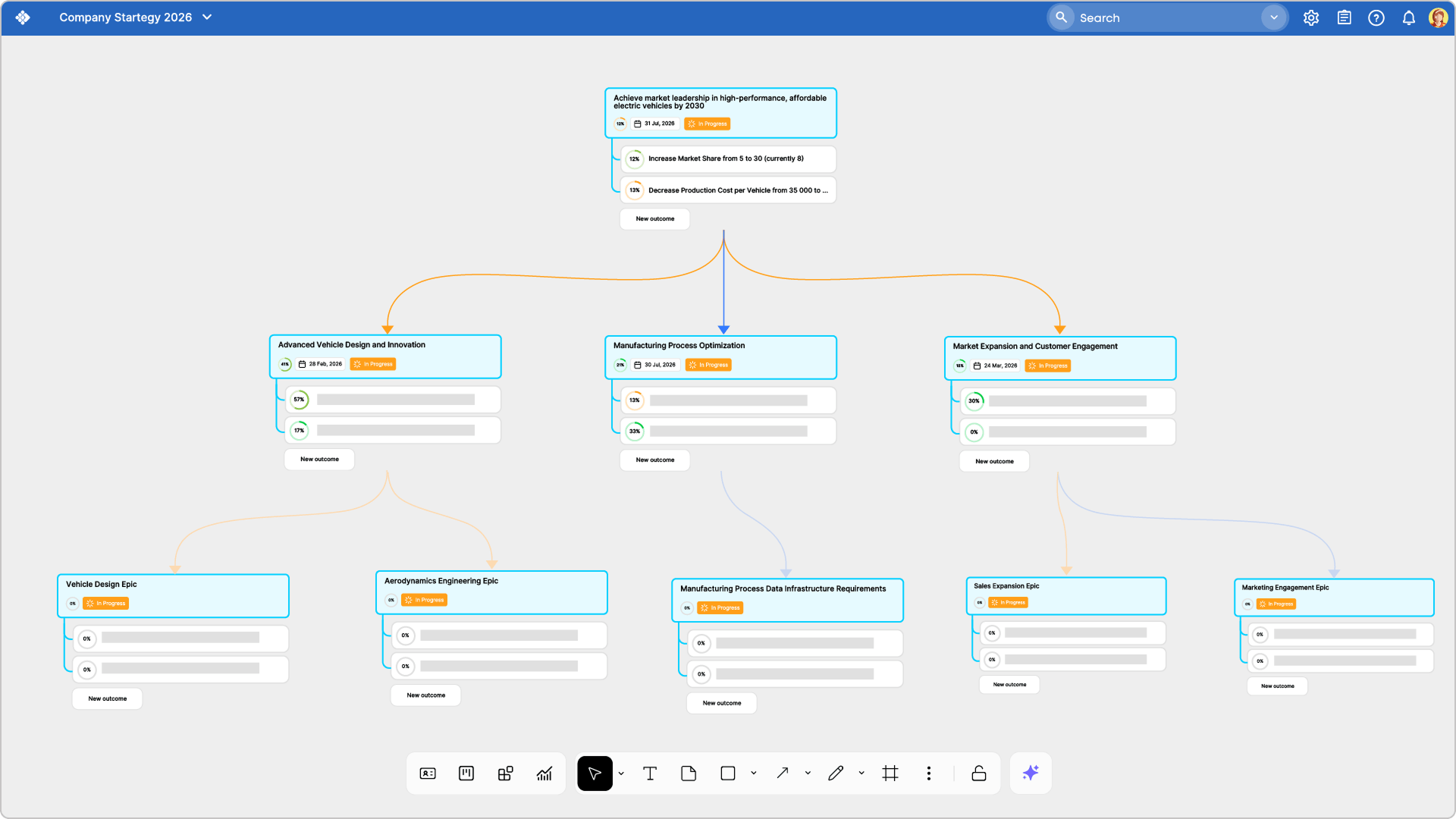 Generating a strategy breakdown structure using the AI Canvas board in Businessmap
Use AI for Portfolio Visibility and Executive Reporting
Project portfolio managers need visibility. Executives rarely need more dashboards. They need clearer explanations of what the dashboards mean.
With Businessmap, portfolio work can be visualized across management and team-level boards. Portfolio Workspaces help leaders see work across multiple teams, while dashboards and reports show progress, blockers, outcomes, and flow. AI can turn that detailed work data into concise updates for meetings, leadership reviews, and portfolio check-ins.
For example, instead of manually collecting updates from five teams, a portfolio manager can use AI-supported summaries and workflow analytics to prepare a focused review: what moved, what stalled, what is blocked, and what needs leadership attention.
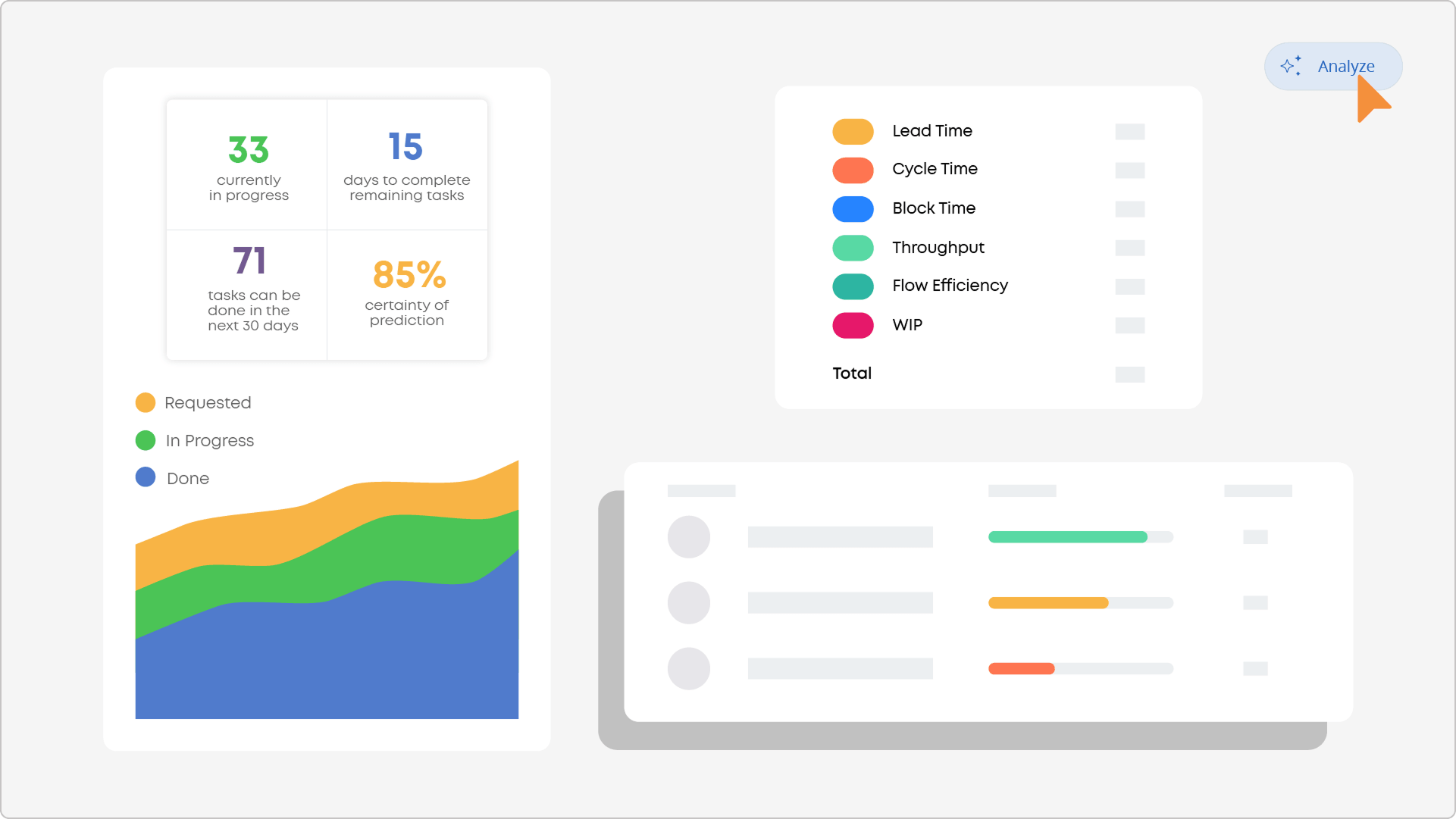 Analyzing work performance data in conversational mode in Businessmap
Use AI for Resource Allocation and Capacity Planning
AI can help with resource allocation and capacity planning when it has access to reliable work data.
In Businessmap, teams visualize work in progress, blockers, cycle time, throughput, dependencies, and more. Through a variety of built-in reports based on work performance data, coupled with AI insights, leaders can see whether teams are overloaded, their allocation, where work waits too long, and overall available capacity.
AI support the conversation by highlighting patterns that are easy to miss: recurring blockers, aging work, overloaded lanes, or initiatives that depend on constrained teams. The decision still belongs to leaders, but AI makes the trade-offs easier to see.
Use AI for Scenario Planning and Risk Detection
AI supports portfolio scenario planning by helping leaders compare options and answer questions like: Should we delay one initiative? Reassign capacity? Reduce scope? Change priority?
Businessmap supports these decisions through connected work structures, initiative management, analytics, forecasting, and visual workflow data. When portfolio work is linked to execution, scenario planning becomes more grounded. Leaders can evaluate real constraints, dependencies, and delivery signals instead of debating abstract plans.
AI can also help detect risks earlier. A project may still look green, but if related work is blocked, cycle time is increasing, and dependencies remain unresolved, the risk is already forming. AI-supported analysis helps leaders spot those weak signals before they become missed commitments.
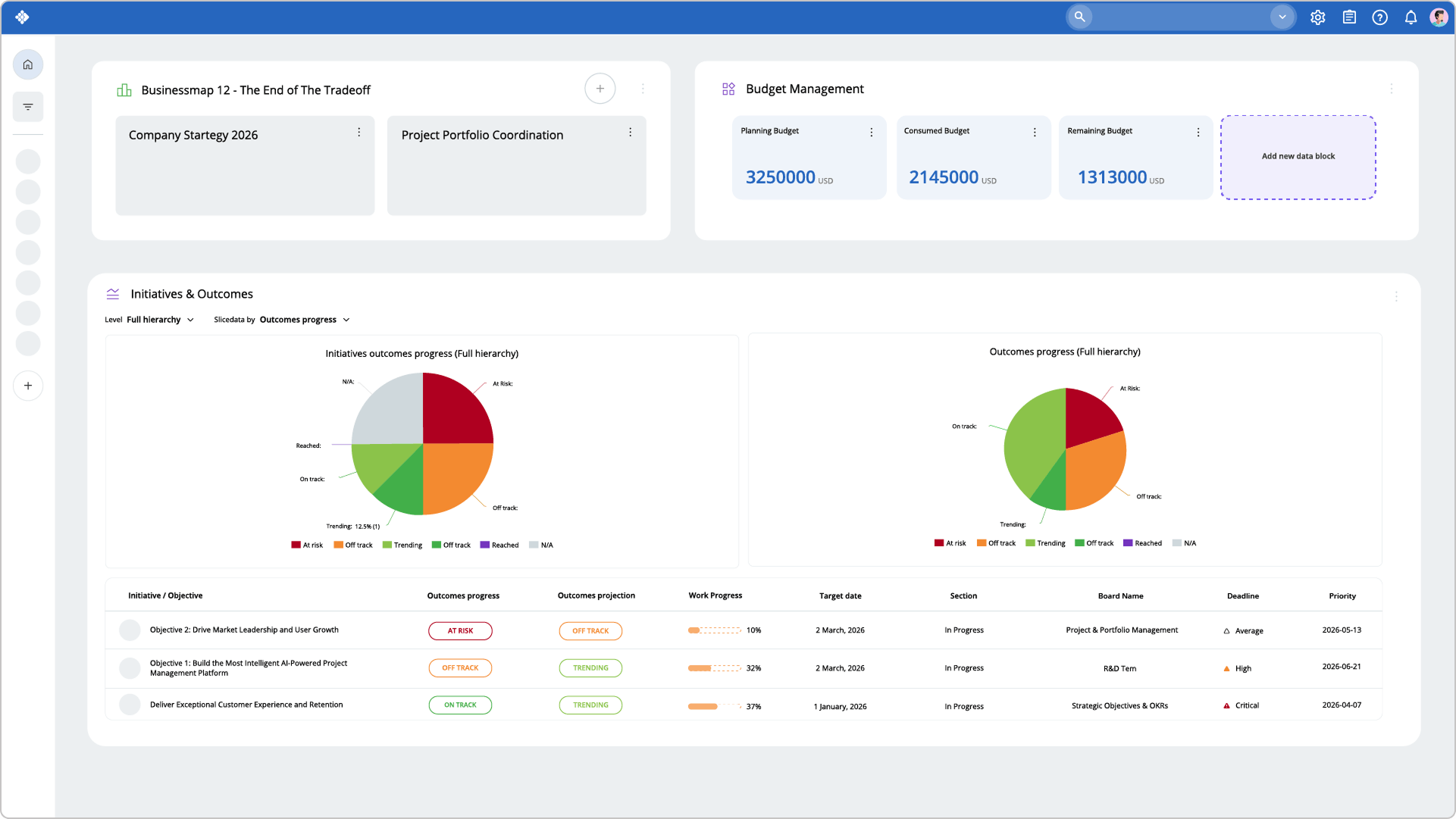 Visualizing goals progress and related initiatives status using executive dashboards in Businessmap
What Should Enterprise Teams Look for in AI PPM Solutions?
What Integrations and Controls Does an AI PPM Platform Need?
An AI PPM platform should connect with the tools where strategy, delivery, and operational data already live. Leaders should look for integrations with Agile delivery tools, communication platforms, email, repositories, BI systems, and enterprise identity providers.
Businessmap supports this through integrations, API connectivity, Azure Repos integration, Power Automate scenarios, OpenSearch-based API querying, and native MCP support. MCP is especially relevant for AI-enabled PPM because compatible AI clients can work with Businessmap cards, subtasks, comments, links, and related work through a structured interface.
Security and privacy matter just as much. A mature AI PPM environment needs role-based permissions, SSO, audit logs, admin controls, and clear decision ownership. Businessmap supports enterprise governance through roles, permissions, privileges, account security controls, audit logs, and SAML SSO.
Who Are AI-Powered PPM Solutions Best Fit For?
AI-powered PPM solutions are best fit for enterprise teams that manage complex portfolios, cross-functional dependencies, and strategic work across multiple delivery teams.
- PMOs use AI PPM to reduce manual reporting, identify portfolio risks earlier, and create a more reliable view of project health.
- Strategy teams use AI PPM to connect strategic objectives with real initiatives, outcomes, and execution progress.
- Transformation leaders use AI PPM to coordinate change initiatives across departments without losing visibility into dependencies, blockers, and capacity constraints.
- Portfolio managers use AI PPM to prioritize investments, compare trade-offs, and understand where demand exceeds delivery capacity.
- Enterprise Agile leaders use AI PPM to connect team-level work with higher-level outcomes, governance, and portfolio decisions.
Businessmap fits these teams because it does not treat portfolio management as a static reporting layer. It connects planning, governance, execution, analytics, and AI-supported improvement in the same system.
What Makes Businessmap Different from Traditional PPM Tools with AI Add-Ons?
Traditional PPM tools often add AI on top of existing reporting workflows. That can help but it does not solve the deeper problem of portfolio data still fragmented, and disconnected from delivery.
In Businessmap, AI works close to the actual system of work.
Teams can use AI Canvas to structure portfolio plans, generate outcomes and OKRs, create linked child work, and turn planning content into clearer next steps. Leaders can use workflow analytics, dashboards, and Portfolio Workspaces to see what is moving, what is blocked, and where execution is drifting from strategic intent.
Businessmap also supports native MCP connectivity, which helps compatible AI clients work with Businessmap data and actions through a structured interface. That matters for enterprise AI because portfolio leaders need AI to work with governed work data, not copied context from isolated tools.
For enterprise PMOs, this is the difference between AI as a feature and AI as part of the portfolio operating system.
Watch how Businessmap's powerful solution for modern project portfolio management can help you adopt a more flexible, AI-powered approach to work management.
FAQ
Can AI help with resource allocation and capacity planning?
Yes. AI can analyze work in progress, blockers, assignments, cycle time, throughput, and dependencies to show where portfolio demand may exceed team capacity.
How does AI support portfolio scenario planning?
AI helps leaders compare options such as delaying, accelerating, deprioritizing, or resequencing initiatives. The quality of the insight depends on how well portfolio work is connected to execution data.
What are the risks of using AI with poor-quality project data?
The main risk is false confidence. AI may summarize stale statuses, miss hidden dependencies, or recommend decisions based on incomplete capacity data.
What security controls should protect project data?
Look for role-based access, SSO, audit logs, admin controls, permission-aware data access, and secure integrations.
Is AI included in the base PPM plan or sold as an add-on?
AI packaging varies by vendor and can change over time. Leaders should confirm which AI features are included, whether usage limits apply, and what enterprise controls are available.
If your goal is to move beyond AI experimentation and improve how your organization plans, funds, and delivers strategic work,

Nikolay Tsonev
Product Marketing | PMI Agile | SAFe Agilist certified
Nick is a seasoned product marketer and subject matter expert at Businessmap, specializing in OKRs, strategy execution, and Lean management. Passionate about continuous improvement, he has authored numerous resources on modern-day management. As a certified PMI practitioner and SAFe Agilist, Nick frequently shares his insights at Lean/Agile conferences and management forums.